
 Freelancers
 Advertisers
 Churches
 Charities
 Free Plugin
 Free vs Pro
 Reviews
 Blog
Blog Guides

Most WooCommerce stores treat this as an unavoidable cost. They watch the churn rate climb, wonder why new signups barely offset the losses, and keep chasing acquisition instead of plugging the leak that already exists.
That is exactly what we built Subscription Recovery to fix. It is a new add-on for WPSubscription, the complete subscription plugin for WooCommerce for WordPress that gives you a real, automated way to reach cancelled and expired subscribers, offer them a reason to come back, and recover revenue that most stores quietly write off.
This post walks through everything: what it does, how each piece works, and why your store needs subscription recovery for WooCommerce right now.
The Problem Subscription Recovery Solves
Think about what happens when a subscription expires or a customer cancels. In most WooCommerce setups, absolutely nothing. The subscription status changes. A cancellation email might go out. Then it is over.
Research shows that a significant portion of cancelled subscribers will return if contacted with the right offer at the right time. The barrier to winning them back is usually not that they hate your product.
It is that the conversation never happened. Nobody reached out. Nobody made it easy to come back.
Subscription Recovery starts that conversation automatically. It watches your subscriber list, identifies people who have cancelled or let their subscription expire, and sends them a targeted email with a compelling reason to resubscribe. For stores looking to reduce subscription churn, this is the most direct lever you can pull.
If you are already using our Subscription Health feature to monitor at-risk accounts, Recovery is the natural next step — it turns that visibility into action.
What Is Subscription Recovery
Subscription Recovery is a dedicated add-on for WPSubscription. You download it from your WPSubscription account, install it like any WordPress plugin, and it activates a full campaign management system inside your WPSubscription dashboard.
Once active, you get access to four interconnected tools: a recovery report, campaign management, discount configuration, and email template customization. Each handles a different part of the win-back process, and together they cover the complete WPSubscription features that power your recovery engine.
Recovery Report: Know Exactly What You Have Won Back
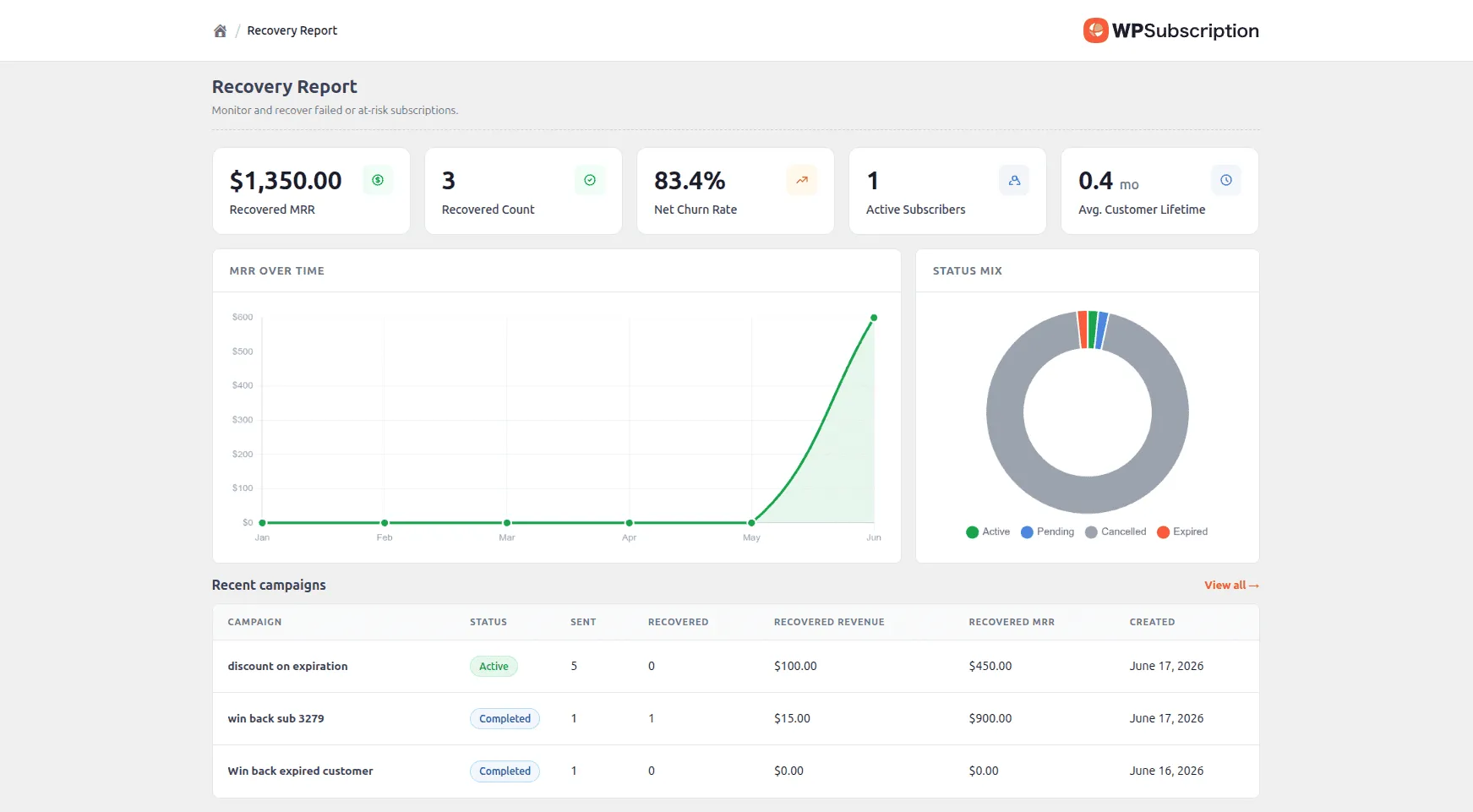
The first thing you notice when you activate Subscription Recovery is the dashboard. It shows you the numbers that actually matter for a win-back strategy.
At the top you see your Recovered MRR, the monthly recurring revenue you have brought back through your campaigns. Below that is your Recovery Count, showing how many individual subscriptions have been reactivated.
You also get a Recovery Rate view and an MRR trend chart so you can see whether your efforts are making a meaningful dent over time.
This matters because most store owners have no idea how much revenue is sitting in their cancelled subscriber list. The Recovery Report makes that number concrete and visible.
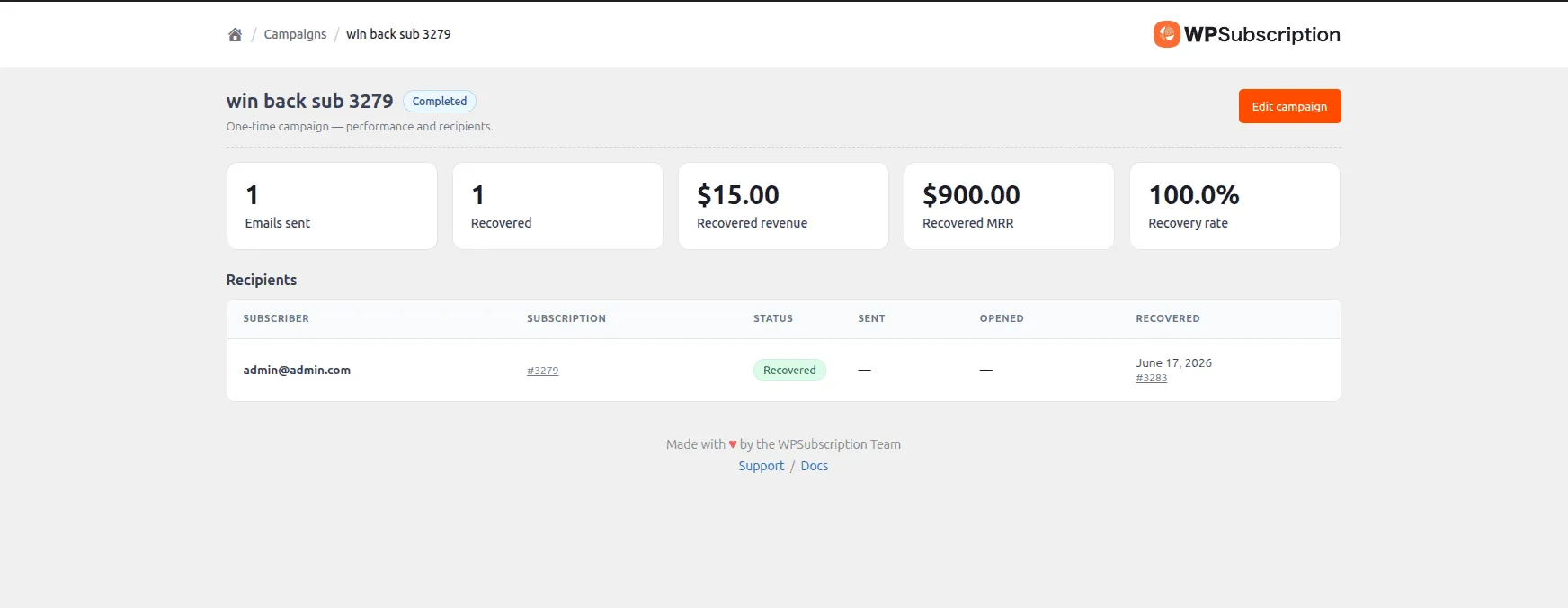
The campaign-level breakdown goes further. For each campaign you run, you see how many emails were sent, how many subscriptions were recovered, the recovery rate as a percentage, and the total revenue recovered per campaign.
Campaign Management: Three Ways to Reach Lost Subscribers
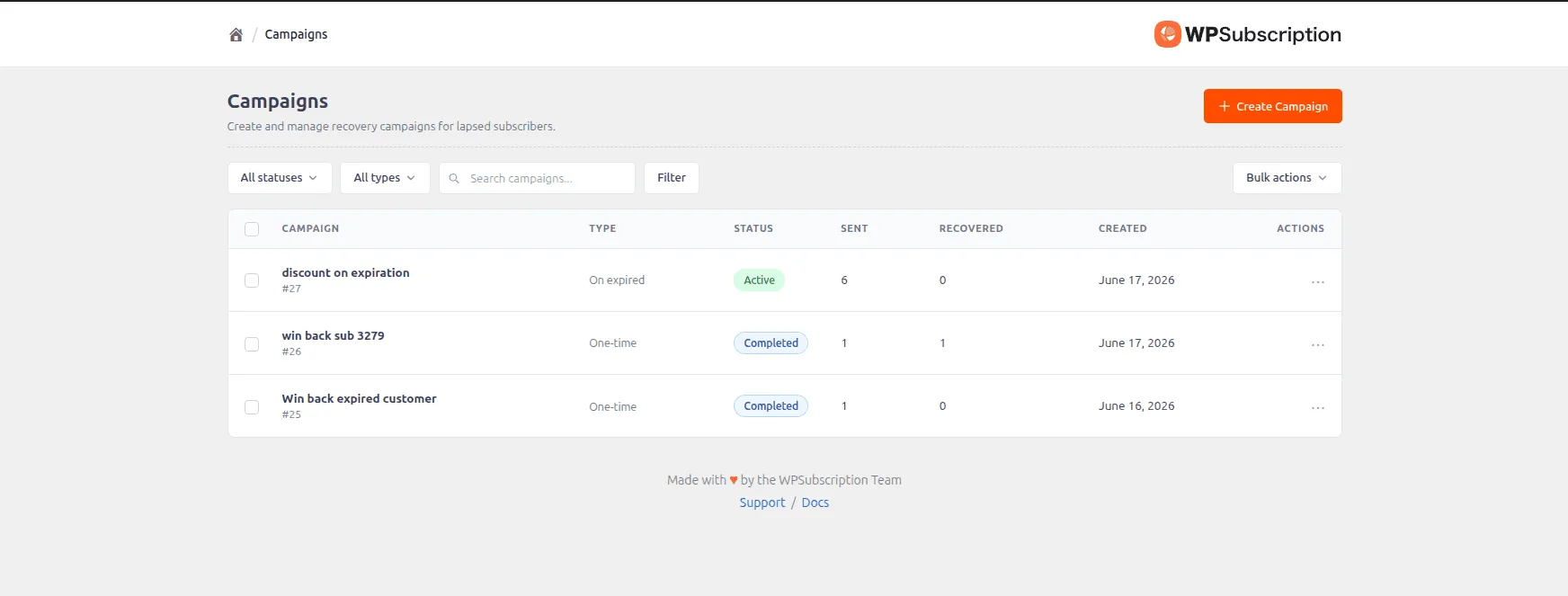
Campaign management is the core of subscription recovery for WooCommerce. This is where you create and control the outreach that goes to your cancelled and expired subscribers.
There are three campaign types, each designed for a different situation.
One-Time Campaigns
A one-time campaign runs once and targets a specific group of subscribers based on filters you set. You can filter by product, subscription status, billing period, and how long the subscription has been inactive.
This is useful for seasonal promotions. For example, a mid-year offer to everyone who cancelled in the first quarter, or a targeted discount for customers on a specific subscription plan.
Scheduled Campaigns
Scheduled campaigns work like one-time campaigns but fire on a future date you specify. This is perfect for planning ahead.
You can set up a Black Friday win-back campaign weeks in advance, then let it fire automatically on the day without any manual work.
You still apply the same filters (product, status, billing period, tenure), so you can be as targeted as you need.
Recurring Campaigns
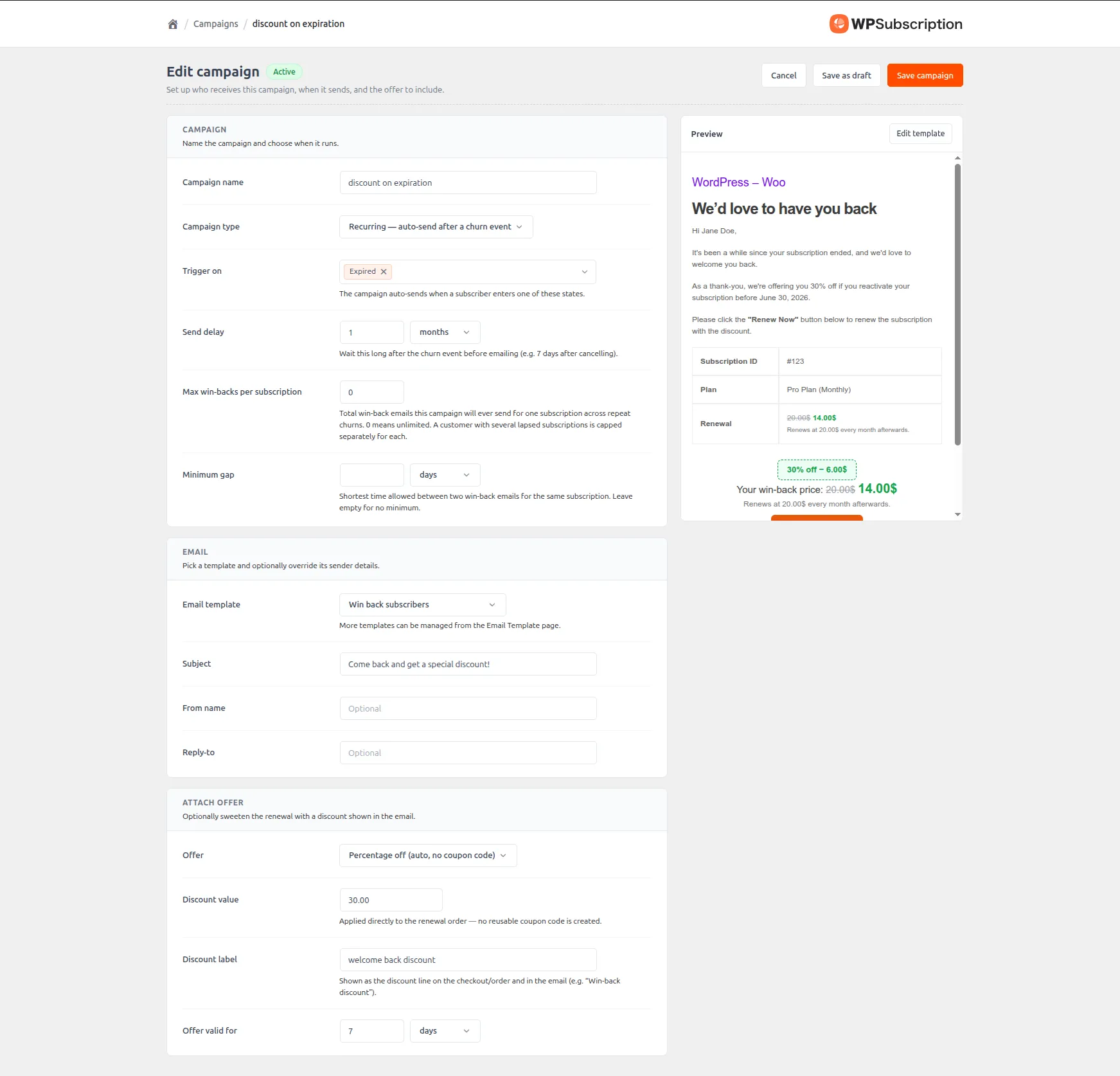
This is the most powerful type for stores with steady churn. A recurring campaign runs continuously and fires automatically whenever a subscriber matches the trigger conditions, usually when a subscription reaches a certain expired or cancelled status.
You can set a cap on how many times the same subscriber receives a discount, which prevents training your audience to wait for a deal.
A subscriber might receive a recovery offer once or twice, but after that they will not keep getting the same email on a loop.
Recurring campaigns are the closest thing to a set-and-forget churn recovery system. Once configured, they run in the background and keep working without you lifting a finger.
Once a campaign is saved it begins working immediately. You can view per-campaign performance any time in the detail view, which shows emails sent, recovery count, recovered revenue, and recovery rate at a glance.
Discount Options: Give Subscribers a Real Reason to Return
A recovery campaign without an incentive is just another email. Subscription Recovery gives you three discount types to make your outreach actually compelling.
Percentage discounts are the simplest approach. A percentage off the next renewal or subscription price works great for any price point. If your subscription is $49 per month, a 20% discount brings it to $39.20, which is often enough to tip a hesitant customer back into resubscribing.
Fixed amount discounts give a specific dollar value off the subscription price. These work well for higher-ticket subscriptions where a percentage might feel too abstract. “Get $20 off your next renewal” reads more tangibly than “save 15%.”
Existing WooCommerce coupons let you use coupon codes you have already created inside WooCommerce. If you have seasonal promotions or existing discount infrastructure, you can plug them directly into your recovery campaigns.
Email Templates: Make Every Recovery Email Feel Personal
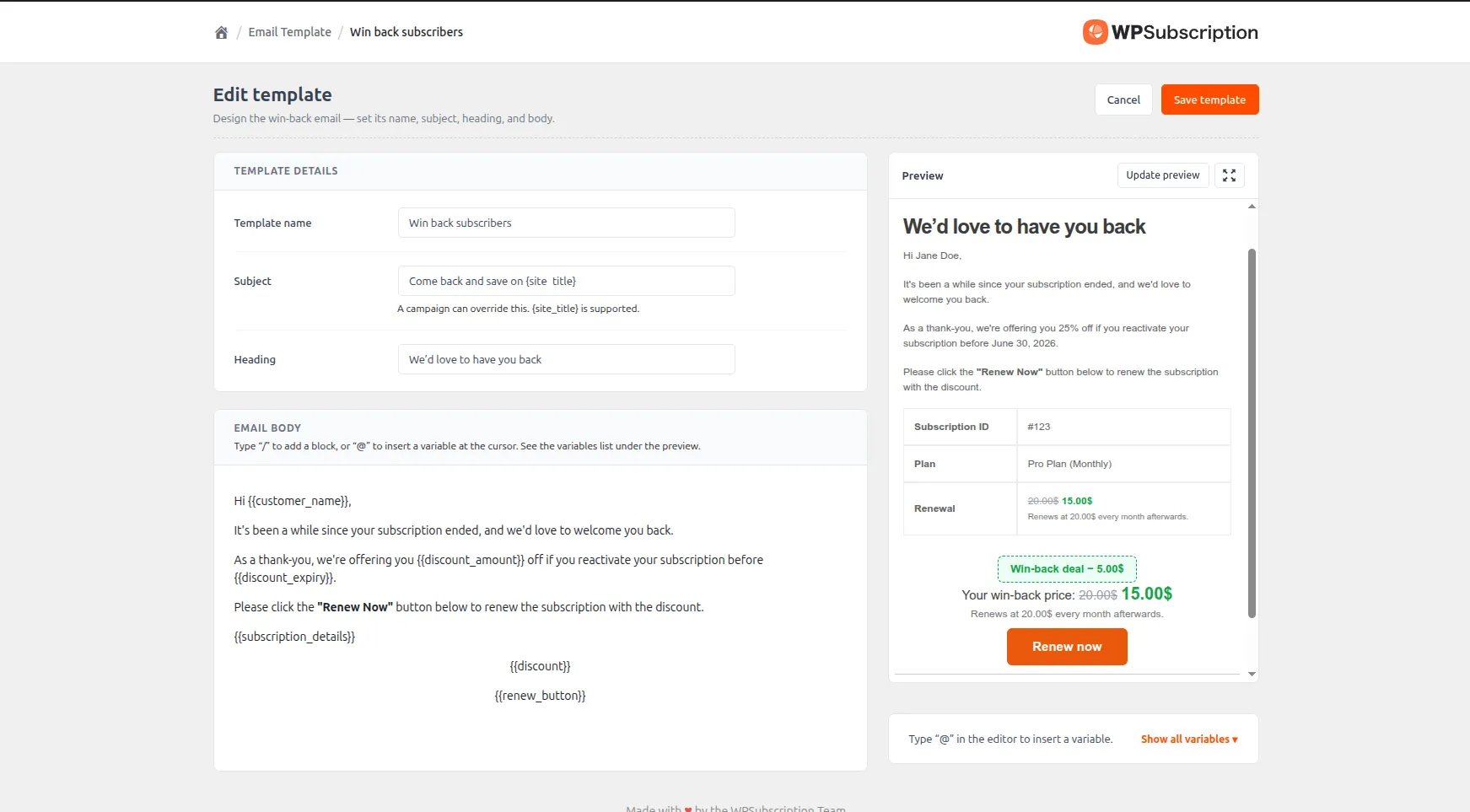
A recovery campaign lives or dies on the email. If you already know how to customize WooCommerce renewal emails, the template editor here will feel immediately familiar — you get the same flexibility, extended for win-back flows.
The editor uses Gutenberg blocks, which means you build your recovery emails with the same familiar WordPress editor you already know. Add text, images, buttons, and layout blocks exactly the way you would edit any WordPress content.
The real power is in the placeholder variables. Type the @ symbol inside the editor and a dropdown of available variables appears: the subscriber’s first name, the subscription product name, the expiry date, the discount amount, and the claim link.
You can also customize the subject line, the sender name, and the reply-to address for each campaign separately.
The real-time preview shows you exactly how the email will look before you send it.
Pro tip: Personalized subject lines with
@first_nameconsistently outperform generic subject lines. Start with “Hi [Name], we saved something for you” and test from there.
Real-World Use Cases
Here is what subscription recovery for WooCommerce looks like in practice for different types of stores.
Membership sites. If you run a content membership and a subscriber cancels after a few months, a recurring campaign can automatically send them a personalized email one week later with a 15% discount on their first month back.
Plugin and theme sellers. Customers who let their annual license expire are often still using the product. A scheduled win-back campaign timed to fire 7 to 14 days after expiry, with a fixed $20 discount on renewal, is often all it takes to bring them back before they find a competitor.
Online course platforms. Students who signed up for course access and cancelled during a free trial often do not leave because the content is bad. They leave because something distracted them.
Service retainers and agencies. Clients who pause a retainer subscription respond well to campaigns that acknowledge the gap and offer an incentive to restart.
Who Subscription Recovery Is For
Subscription Recovery is built for any WooCommerce store owner who sells anything that renews. If you have more than a handful of active subscribers and you have never systematically reached out to lapsed customers, you have money sitting unclaimed in your subscriber list. Pairing it with our guide on fixing low subscription renewal rates gives you a complete picture of the revenue you can recover.
It works just as well for small stores with a few dozen subscribers as it does for larger operations with thousands. The campaign logic scales, and the recovery report keeps you informed no matter the volume.
You do not need technical skills to use it. The campaign setup is straightforward, the email editor is familiar, and once your first recurring campaign is running, it does the work automatically.
All the heavy lifting happens inside the same WPSubscription dashboard you already use to manage your subscriptions.
How to Get Started
Getting subscription recovery for WooCommerce running takes about ten minutes.
Install the add-on. Download the Subscription Recovery add-on from your WPSubscription account dashboard. Go to Plugins → Add Plugin → Upload Plugin in your WordPress dashboard, upload the file, and activate it.
Create your first campaign. Head to the Subscription Recovery section in your WPSubscription dashboard. Click “Create Campaign” and choose the type that fits your goal. For most stores, starting with a recurring campaign targeting expired subscriptions is the fastest way to see results.
Set your discount. Choose a percentage, fixed amount, or existing coupon. Keep it meaningful enough to create real urgency without undermining your full-price subscribers.
Customize the email. Use the Gutenberg editor to build your recovery email. Add the subscriber’s first name, the product name, the discount amount, and a clear claim link using the @ placeholder variables. Preview it before publishing.
Launch and monitor. Activate the campaign and watch the Recovery Report. You will start seeing email sends, recovery counts, and recovered MRR accumulate as the campaign runs.


