Freelancers
 Advertisers
 Churches
 Charities
 Free Plugin
 Free vs Pro
 Reviews
 Blog
Blog Guides

Key takeaways
- WPSubscription 2.0 decouples recurring billing schedules from catalogue products using reusable subscription plans.
- Set up billing frequencies, trial periods, and signup fees once, then attach multiple products seamlessly.
- Provide multiple duration options (such as Monthly, Quarterly, and Annual) directly on single product pages.
- Offer permanent subscriber discounts with automatic strikethrough pricing and dynamic savings badges.
- Generate direct checkout and add-to-cart links to send email and social traffic straight to checkout.
- 100% backward compatible: easily switch between classic simple mode and plan mode without breaking existing subscriptions.
Running recurring revenue on WordPress has traditionally come with an annoying tradeoff. If you sold twenty products on recurring billing and wanted to introduce a quarterly payment option, you had to open twenty separate product pages, click through multiple settings tabs, and retype the exact same billing rules twenty times.
If you wanted to test a seasonal discount across an entire catalogue or adjust your delivery cadence, you faced hours of tedious database edits. With the release of WPSubscription 2.0, that manual headache is gone.
Version 2.0 introduces a major architectural leap: Subscription Plans.
Instead of hardcoding recurring billing rules directly into every single WooCommerce product, WPSubscription now decouples your billing schedules from your catalogue items.
With modern subscription plans management, you build a subscription plan once—setting up your billing intervals, trial periods, and delivery parameters—and attach as many products as you want to that single plan.
Each product brings its own base price, while the plan manages the schedule, delivering flexible WooCommerce subscription plans tailored to your store’s audience.
If you want to create high-converting WooCommerce subscription plugin plans without wrestling with rigid plugin settings or custom code, here is a complete walkthrough of how the new system works and how to set it up on your store.
Why Traditional WooCommerce Subscription Plans Needed a Rewrite
To understand why subscription plans are such a big step forward, look at how classic tools for building WooCommerce subscription plans (including WooCommerce subscription tools and WPSubscription 1.x) have historically operated.
Under the traditional per-product model, a subscription is tied directly to an individual product type. When you create an item, you choose whether it renews every month, every three months, or every year.
While this works for stores selling only one or two items, it creates immediate bottlenecks as your store grows:
- Repetitive Catalogue Management: If you sell coffee and want customers to choose between weekly and monthly deliveries, you previously had to configure complex variable products with dozens of variation combinations.
- Maintenance Bottlenecks: Without centralized subscription plans management, shifting from a 30-day billing cycle to a 4-week cycle required manually editing every single subscription product across your store.
- Clunky Storefront Displays: Older setups usually offer plain radio buttons that fail to highlight the clear financial advantage of subscribing over buying once.
WPSubscription 2.0 solves this by cleanly separating what you sell from how often you charge, which makes scaling your WooCommerce subscription plans across hundreds of SKUs completely effortless.
The Three Core Pillars of WPSubscription 2.0
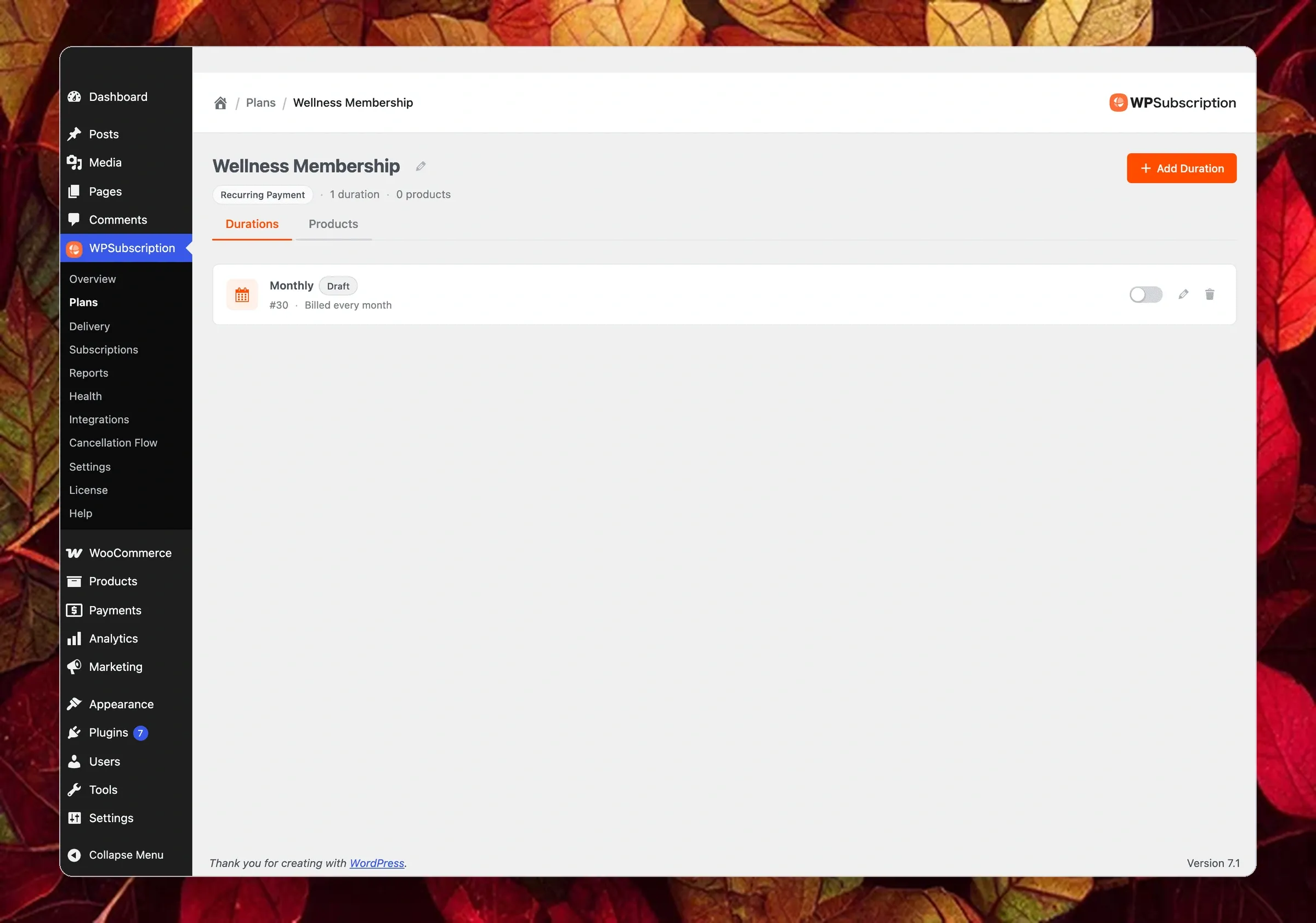
The new architecture revolutionizes how stores structure WooCommerce subscription plans into modular layers. Think of your subscription catalogue as three distinct layers:
- Plan: The named master container and business model (Subscribe & Save, VIP Club, Quarterly Box).
- Duration: The specific billing schedules inside the plan (Every 1 Month, Every 3 Months, Every 1 Year).
- Product: The WooCommerce items attached to the plan, each carrying its own pricing (Colombian Blend $18/mo, French Roast $32/mo).
This three-layer subscription plans management model ensures that updating a schedule never breaks live subscriptions.
When you update a plan or add a new duration, every product attached to that plan inherits the update automatically. Subscriptions that existing customers have already purchased remain completely safe, continuing to renew on the exact terms recorded at checkout. This protects your MRR and prevents customer confusion during renewals.
Step 1: Creating Your Master Subscription Plan
Setting up master WooCommerce subscription plans takes less than two minutes from your WordPress dashboard.
Navigate to WPSubscription → Plans, click Create Plan, and explore the official subscription plans overview guide for deep configuration strategies.
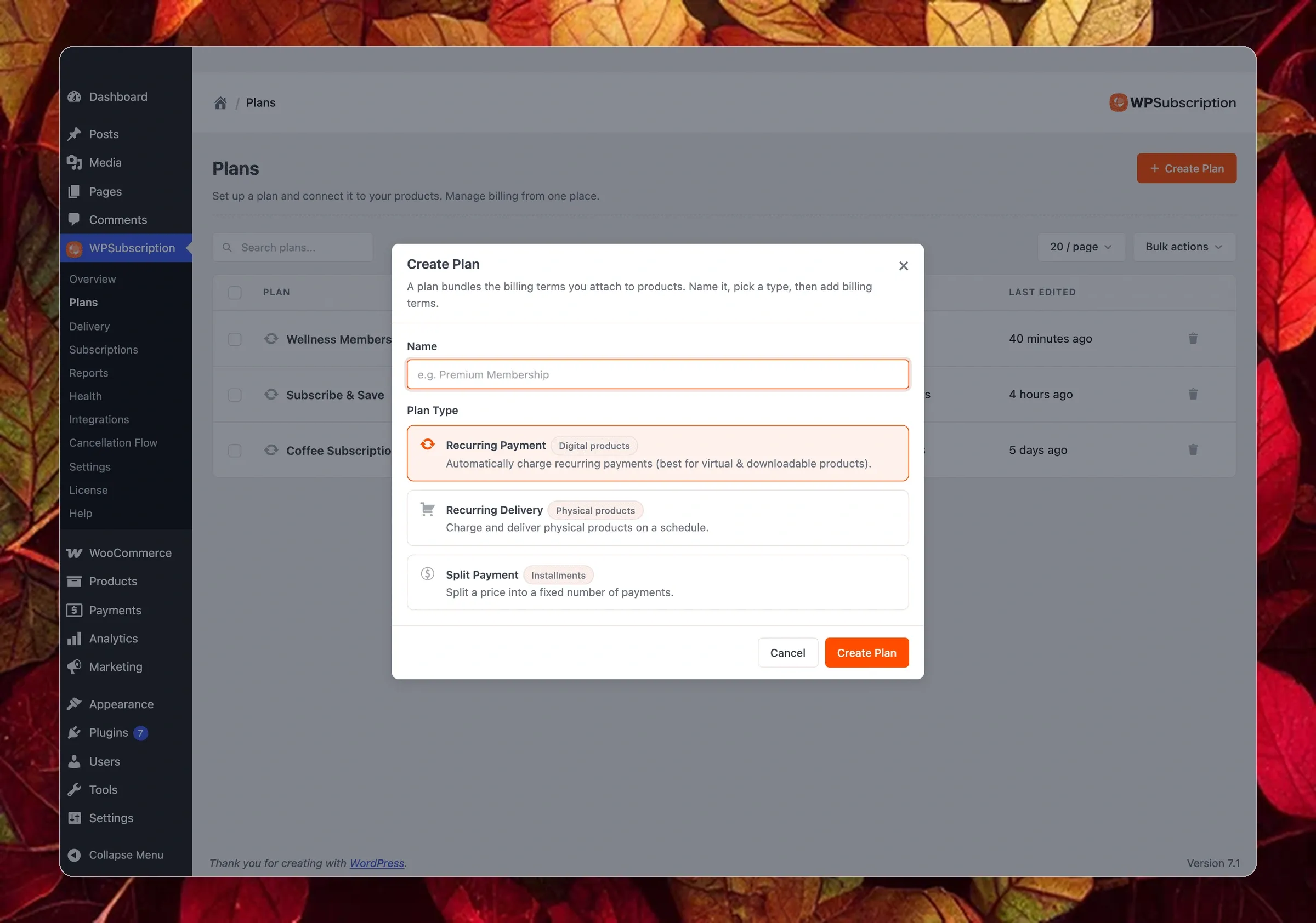
When the creation modal opens, you configure two core settings:
1. Plan Name
This is the customer-facing heading displayed on your product pages above the duration selector buttons. Choose clear names like Subscribe & Save, Wellness Membership, or Roaster’s Choice Club.
2. Plan Type
WPSubscription 2.0 provides three distinct plan architectures:
- Recurring Payment (Free Plugin & Pro): For digital downloads, software licences, online communities, coaching access, and virtual services. It charges customers automatically on a recurring calendar cadence.
- Recurring Delivery (Pro): For physical goods and subscription boxes. It decouples shipping cadence from billing cadence. You can charge monthly while shipping weekly, or synchronize deliveries to dispatch on a specific weekday (such as every Tuesday).
- Split Payment (Pro): For courses, installment programs, or equipment financing. It collects a fixed number of installments (such as 4 monthly payments of $125) and then stops automatically.
Select your plan type, click Create Plan, and your container is ready.
Step 2: Configuring Plan Durations
Once created, your plan opens on the Durations tab with a starter Monthly duration in draft mode, as detailed in our plan durations documentation.
A single plan can hold multiple durations. Each active duration you create becomes an interactive selector button on your single product pages, which gives shoppers the freedom to pick their preferred schedule when buying WooCommerce subscription plans.
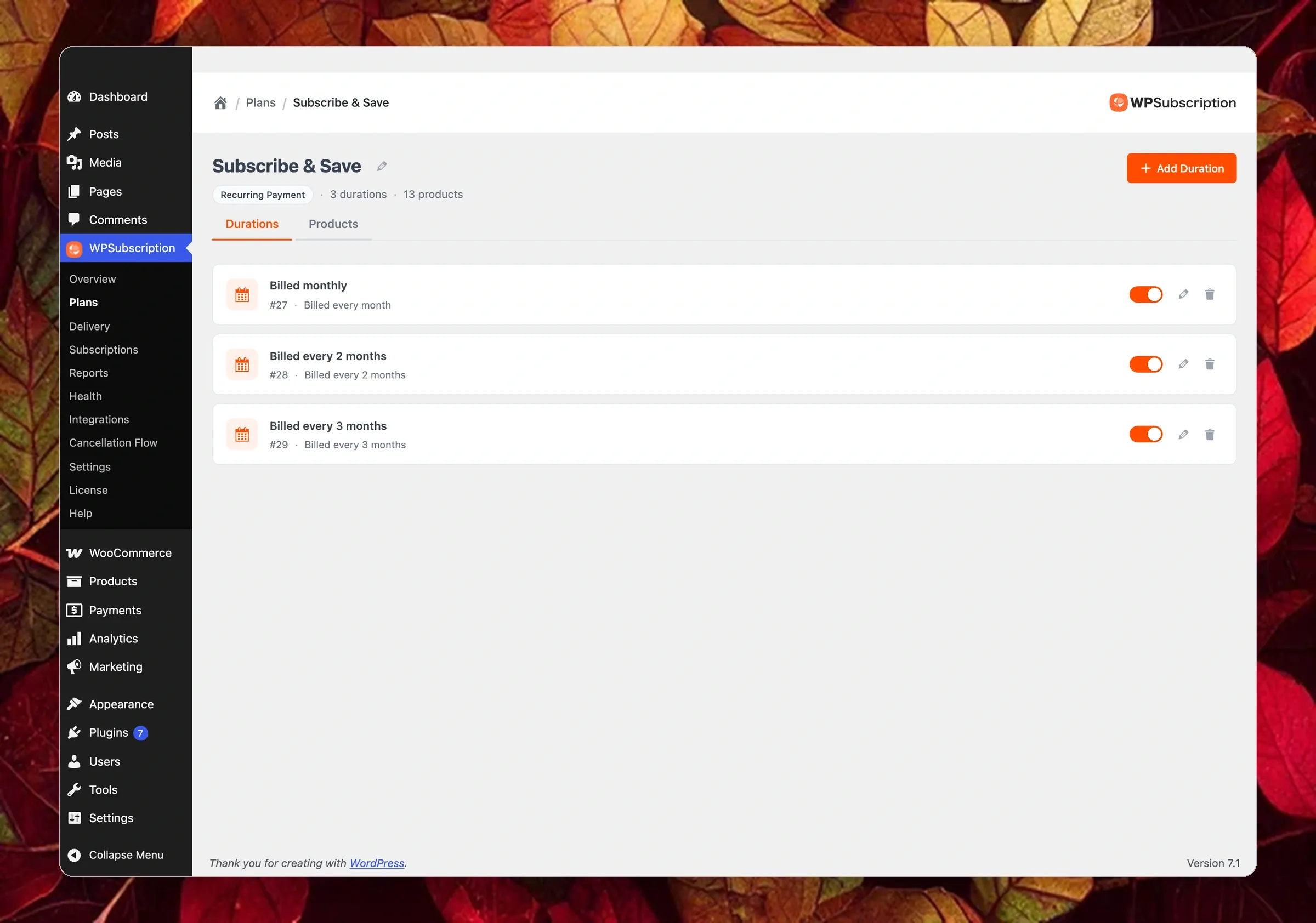
Click Add Duration to build out your schedules:
- Duration Name: The text displayed on the storefront button (Monthly, Billed Every 3 Months, Annual Pass).
- Billing Frequency: Set the recurring cycle using days, weeks, months, or years (
1 Month,6 Weeks,1 Year). - Free Trial Period: Offer a risk-free trial (such as 14 days). The customer enters payment details at checkout, pays $0 upfront, and recurring billing begins after the trial concludes.
- Signup Fee (Pro): Add a one-time setup fee collected solely on the initial order. Future renewals bill at the regular recurring rate.
- Draft vs. Active Status: Keep new durations in draft mode while testing your numbers. Only active durations appear on product pages.
Step 3: Attaching Products & Setting Multi-Tiered Pricing
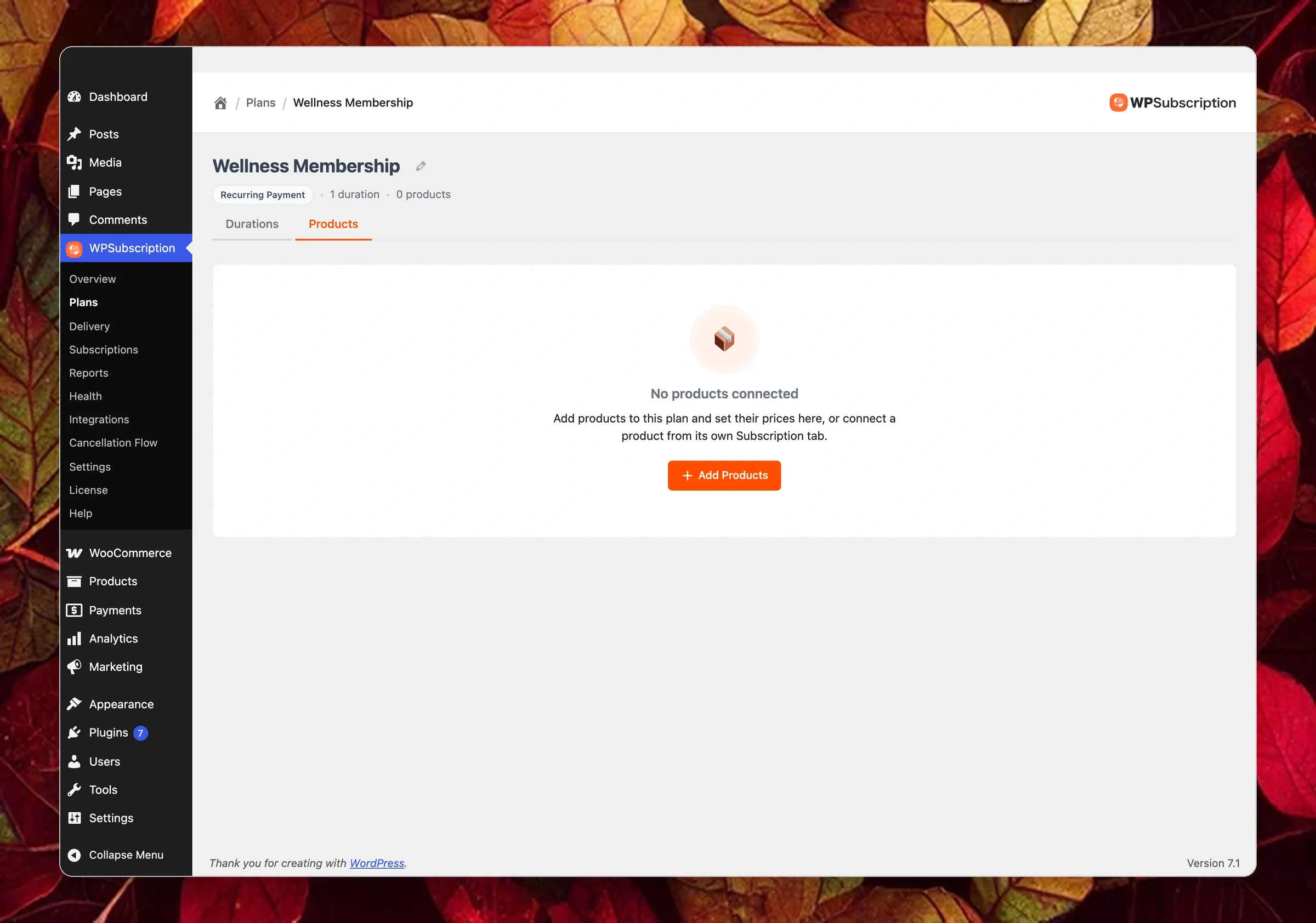
With your plan and durations in place, switch to the Products tab to attach items from your catalogue.
WPSubscription gives store owners streamlined subscription plans management through both bulk plan editing and single-product workflows, as explained in the products and pricing setup guide.
Setting up custom tiered pricing for your WooCommerce subscription plans helps attract both budget-conscious and long-term customers:
- Bulk Management (From the Plan): Perfect when assigning dozens of catalogue items to a single subscription framework at once.
- Single Product Management (From the Product Editor): Ideal when editing an individual item inside the standard WooCommerce product data panel.
Regular Price vs. Offer Price
When you attach a product to a plan, WPSubscription displays a pricing row for every active duration. For each duration, you can set two numbers:
- Regular Price: The standard recurring charge for that duration.
- Offer Price: A discounted recurring charge that overrides the regular price.
When an offer price is present, WPSubscription strikes through the regular price on your storefront and automatically calculates a dynamic savings badge (such as Save 15% or Save up to 25%).
The offer price represents a permanent subscriber discount that applies to every renewal cycle, helping to lower customer churn rate.
Offering One-Time Purchases Side-by-Side
Underneath the duration pricing rows, toggle Allow one-time purchase on.
This links the product’s regular WooCommerce price as an alternative purchase option directly inside the plan buy box. On the storefront, the subscription option is selected by default, while the one-time purchase card sits underneath, highlighting the price difference.
Variable Product Support (Pro)
If you sell products with variations—such as different sizes or flavours—WPSubscription features handle them seamlessly. Each variation receives its own dedicated pricing matrix (e.g., a 250g bag priced at $16/month while a 1kg bag is $48/month).
Step 4: High-Converting Direct Checkout Links
Sending paid traffic or email subscribers to a standard product page forces them to make multiple decisions: pick a size, choose a duration, click add to cart, and navigate to checkout. Every extra click creates friction and hurts conversion rates.
Generating direct checkout links for WooCommerce subscription plans removes friction and skyrockets sales. Check our direct checkout links guide for complete link parameters and URL structure.
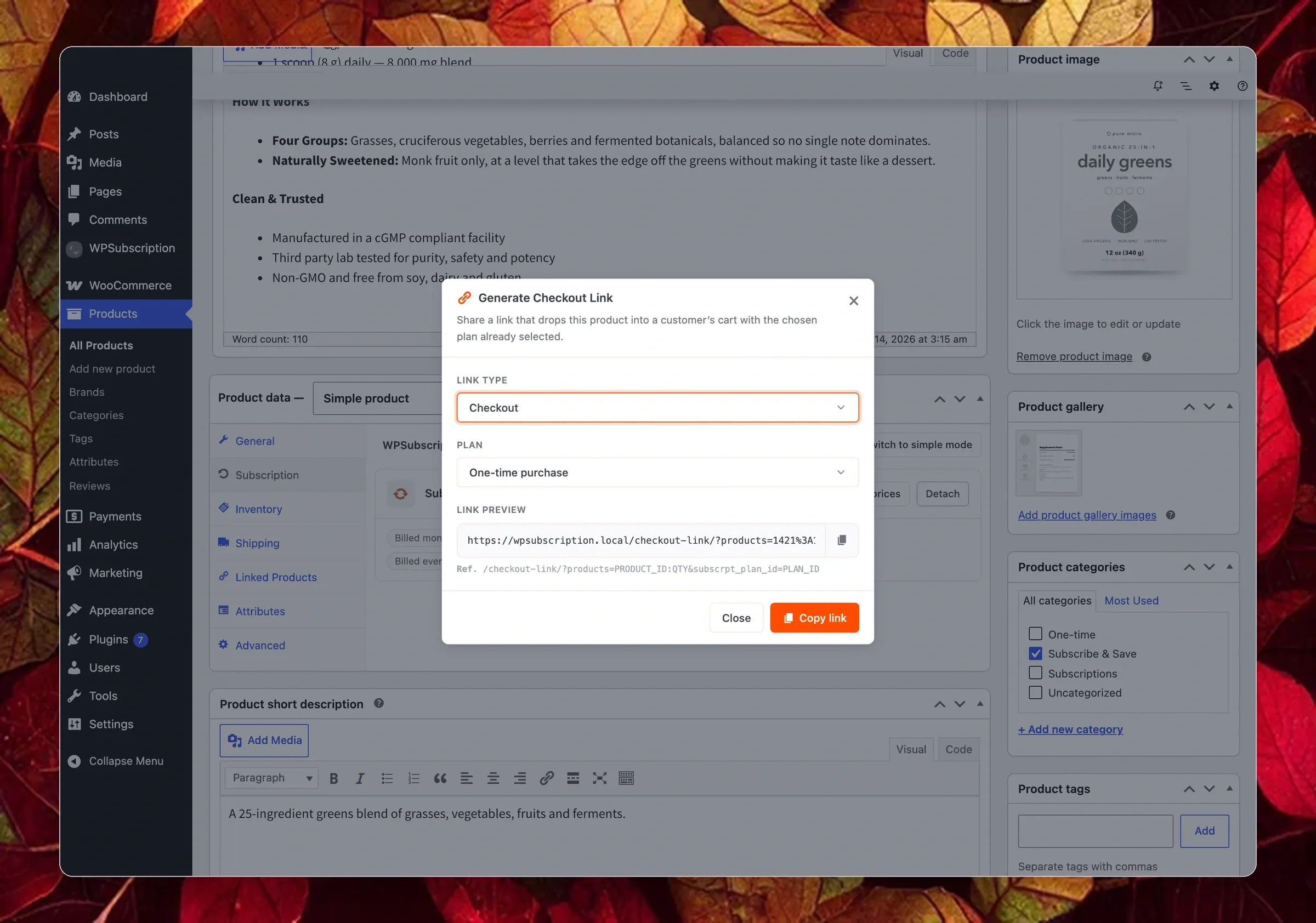
From any connected product, you can grab pre-formatted direct links in two ways:
- Quick Price Chip Copy: In the product editor’s Subscription tab, every active duration chip features a copy chain icon. One click copies a direct checkout URL for that exact product and duration combination.
- Generate Checkout Link Tool: Open the dedicated link generator modal to configure link behavior:
- Direct Checkout: Takes the customer directly to checkout with the product and plan pre-loaded (
/checkout-link/?products=ID:QTY&subscrpt_plan_id=PLAN_ID). - Add to Cart: Adds the selected subscription item to the cart in the background and keeps the shopper on your site (
/?add-to-cart=ID&subscrpt_plan_id=PLAN_ID).
- Direct Checkout: Takes the customer directly to checkout with the product and plan pre-loaded (
You can paste these direct links into email newsletters, launch campaigns, social media posts, or paid ad buttons to bypass the product page entirely.
Step 5: The Storefront Experience: Interactive Buy Box & Cart Clarity
The most noticeable frontend improvement in WPSubscription 2.0 is the Subscription Buy Box on single product pages.
The storefront buy box gives WooCommerce subscription plans a modern, conversion-focused interface that customers love. To customize button styles, labels, and badges, see the complete product display guide.
Without requiring theme edits, custom CSS, or shortcodes, WPSubscription automatically injects an interactive plan selector directly above the WooCommerce Add to Cart button.
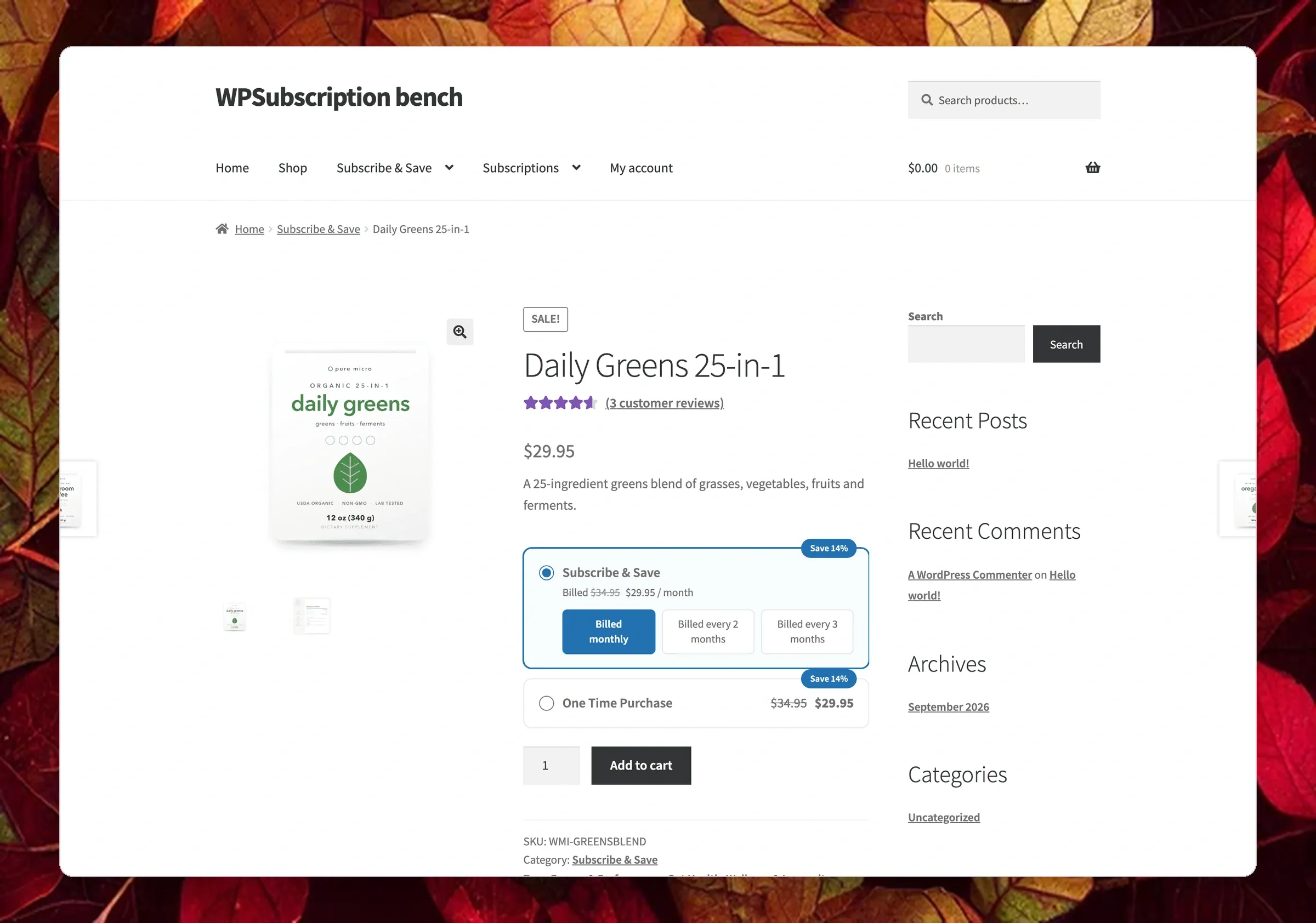
Key advantages of the new storefront buy box include:
- Clear Plan Identity: Displays your custom plan heading (e.g., Subscribe & Save).
- Instant In-Place Switching: Clicking between Monthly, Quarterly, or Annual duration buttons immediately updates the billing note without page reloads.
- Automated Savings Badges: When an offer price is configured, the card dynamically calculates and displays badges like Save 14% (or Save up to 20% if discounts vary across durations).
- Subscription by Default: The subscription card is highlighted automatically upon page load, establishing recurring billing as the primary path.
- One-Time Purchase Card: When enabled, an optional One Time Purchase card appears underneath, making the subscriber discount immediately visible.
Transparent Cart and Checkout Breakdown
When a shopper heads to checkout, clear billing terms build trust and reduce post-purchase disputes.
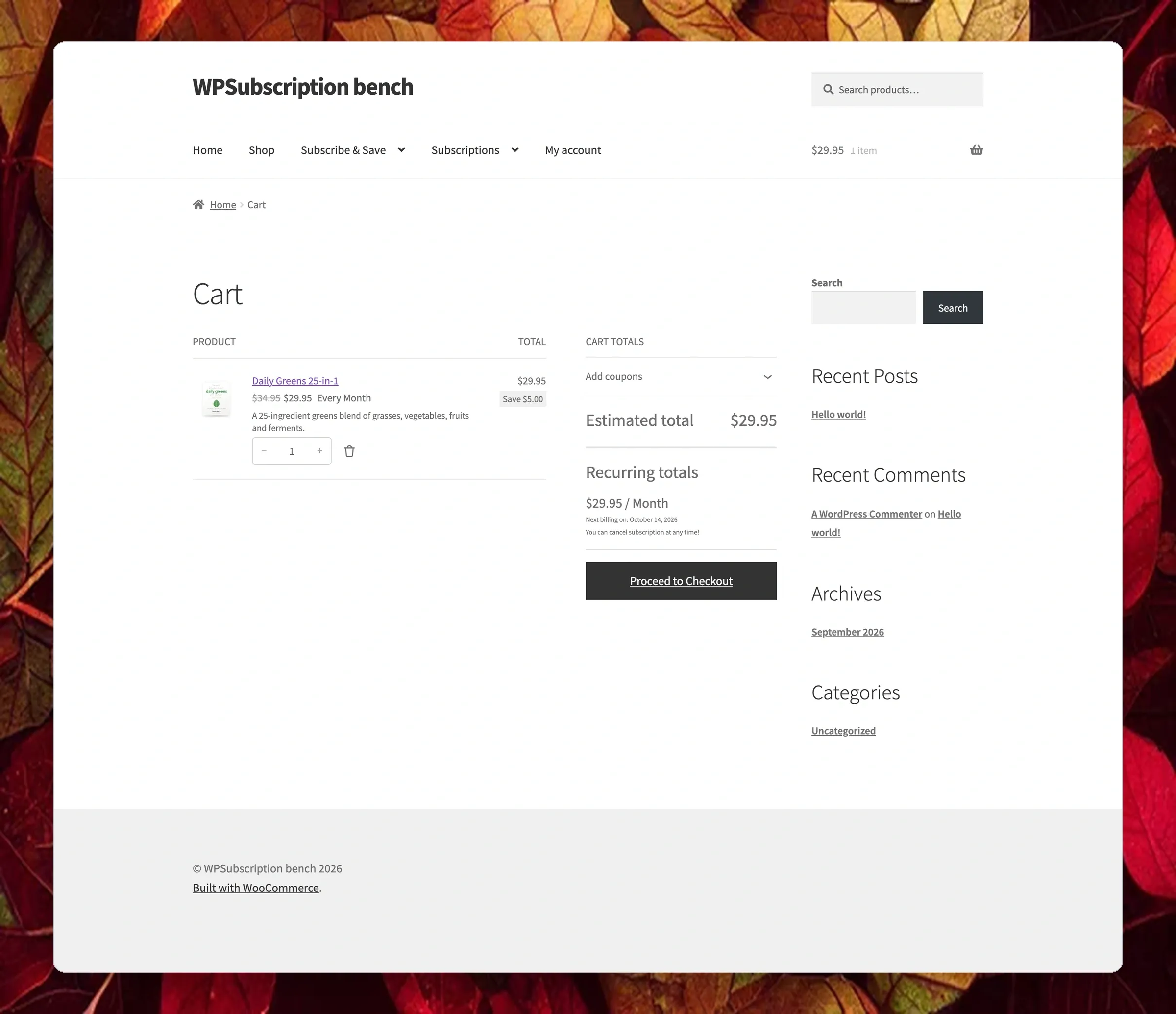
The cart and checkout pages spell out the entire arrangement:
- The recurring item price and active billing frequency.
- The exact savings amount compared to standard one-off retail pricing.
- A dedicated Recurring Totals section confirming the renewal rate and the exact calendar date of the next scheduled charge.
Backward Compatibility: Simple Mode vs. Plan Mode
If you are already running an earlier version of WPSubscription, your store will continue running smoothly.
All existing product-level subscriptions remain active and renew without interruption. Inside the WooCommerce product editor, you will find a Switch to simple mode button that lets you toggle between classic per-product settings and the new Plan mode whenever you want.
Migrating your catalogue to unified subscription plans management can happen at your own pace without risking store downtime or messing up existing proration rules.
Ready to Level Up Your WooCommerce Subscriptions?
The introduction of reusable WooCommerce subscription plans in WPSubscription 2.0 makes creating, scaling, and managing recurring revenue faster than ever. Centralized subscription plans management gives you the freedom to test new pricing models, launch seasonal promos, and turn one-time buyers into predictable recurring revenue.
Ready to Scale Your Recurring Revenue?
Upgrade your store to WPSubscription 2.0 today to unlock reusable subscription plans, direct checkout links, and higher-converting buy boxes.