When you sell online, how people pay can affect your sales and cash flow. Allowing split payments means they can pay bit by bit over time, which makes costly items easier to buy.
On the other side, full payments make buyers pay all at once, making deals simpler and giving you cash fast.
Key Points:
- Split Payments: Cut the price into smaller parts (e.g., $300 every 3 months for a $1,200 item). Great for pricey stuff, repeat plans, or things like teaching. Brings in more buyers but needs careful payment checks.
- Full Payments: Buyers pay all at once (e.g., $500 for a one-time buy). Good for easy deals and quick cash, but might push buyers away due to the big cost upfront.
Quick Look:
| Feature | Split Payments | Full Payments |
|---|---|---|
| Pull for Buyers | Pulls in people with less money | Good for those okay with full pay now |
| Money In | Money comes in bit by bit | Get all money at once |
| Work to Manage | Must keep up with many payments | Very little work to watch |
| No-Pay Risk | More chance of not getting paid | No worry once paid |
Picking the best choice hangs on your biz plan, what your buyers like, and your money needs. Tools such as WPSubscription help handle both pay ways well and give room for both firms and users alike.
How Split Payments Work in WooCommerce
What Are Split Payments?
Split payments let buyers pay for goods or services in small, easy bits. For example, instead of paying $1,200 all at once for a year’s use of software, you could let them pay $300 every three months or $100 each month. This way, high-priced items become easier to buy over time.
Here’s how it goes: The buyer pays a first bit when they buy, and the system keeps taking the same amount later until all is paid. Say you sell a $600 online class, you could make it so they pay $200 now, and then $200 more after 30 and 60 days.
You can mix this plan to fit your shop. Some shops ask for a set first pay, then split the rest equally, while others might take a percent first, then break up the rest into monthly bits.
When to Use Split Payments
Split payments are very good for costly online purchases, where a big one-time cost may turn buyers away. For example, people who make online classes that cost between $500 and $2,000 often use this way to draw more buyers.
Letting customers pay bit by bit can pull in those who might not want to pay all at once.
This helps SaaS companies, too, especially for yearly plans. Rather than asking for $1,188 at the start, splitting it into four parts of $297 each can make it less heavy at first.
This method pulls in more people and helps shops know their money flow over time.
This plan also works well for services like coaching or consulting. Say, a coach charges $3,000 for six months; they might ask for $1,000 first, then $400 each month for five months.
Web agencies might break a $5,000 job into parts like $2,000 at the start, $2,000 in the middle, and $1,000 at the end.
Split Payment Options in WPSubscription
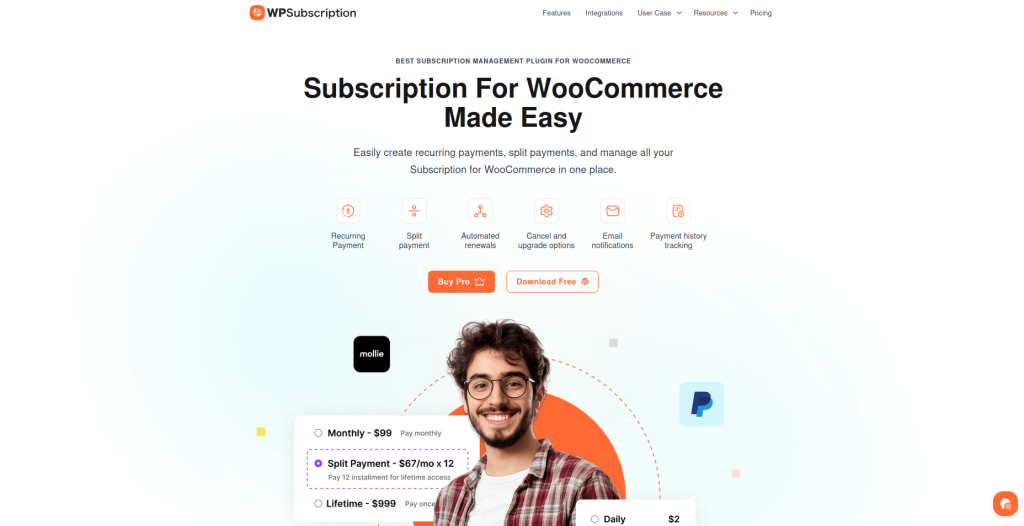
WPSubscription is a WooCommerce tool that makes split payments simple. With no need for tech skills, you can turn your goods into easy payment plans.
The tool does it all, from automatic billing to sending updates, so you can focus on making your shop bigger.
“Through this tutorial, we will guide you step by step on how to configure WooCommerce split payments with the help of a brilliant and user-friendly tool called the WPSubscription plugin. It’s a one‑stop solution that takes care of all the technicalities, allowing you to concentrate on your business.”
– Md. Zannatun Nime
The steps are easy. First, make a product in WooCommerce, pick “Simple product”, and mark the “Subscription” box.
Next, put in the price per part, pick “Split Payment” from the Payment Type list in the Subscription area, and set how often bills come and how many times you will bill.
After the plan is set, WPSubscription does the rest. It plans out payments, reminds people before each bill, and handles transactions on its own.
It also takes care of telling customers, renewing plans, and making sure payments get confirmed, stopping the need to check things yourself.
For things you sell online, the tool lets you control who gets in. You can let people have full rights after the first bill or hold back rights until all bills are paid. For services, you might open new perks or features each time a bill is paid.
“Instead of going through the hassle of managing different tools or following up on invoices, WPSubscription simply allows you to have everything in one place and run it on autopilot once you have made your settings.”
– Md. Zannatun Nime
WPSubscription works with many payment ways, such as Stripe, PayPal, and Paddle. This lets people pay how they like. It also has self-help features, so customers can look at past payments, change how they pay, and handle their own plans from their account area.
This cuts down on the need for help and makes people trust you more. Next, we’ll look more into how full payments go in WooCommerce.
How Full Payments Work in WooCommerce
What are Full Payments?
Full payments are simple: customers pay the full price for a good or service when they check out. They don’t split the cost into parts like split payments do.
Instead, they pay all at once. For example, if you sell a $500 online class, the customer pays $500 right away and finishes the buy in one step.
This way works just like old one-time buys. After the payment goes through, customers can use what they bought right away, and businesses get all the money fast.
Full payments can be for one-time buys or for repeat ones. For a single buy, the customer pays once and gets to keep the product forever.
For subscriptions, they pay all for the time period at once, like paying $120 for a year, and pay again when it’s time to renew.
This way offers a simpler choice next to split payments, fitting different needs businesses might have.
When to Use Full Payments
Full payments are great for online goods, where paying all at once is easy for customers. This way makes sure businesses get money right away, which they can use to pay bills, grow, or start new stuff.
Services like this model too because it makes billing easy, and there’s no need to keep track of many small payments.
Also, many businesses give lower prices for paying in full. For example, they might charge $1,000 upfront instead of $1,200 in four parts. This saves money for customers and lets businesses get money faster.
Next, let’s look at how WPSubscription makes full payments easy in WooCommerce.
Full Payment Features in WPSubscription
WPSubscription makes it easy to manage full payments for both one-time and repeat buys. When you set up a good, you choose full payment as your billing method, and the plugin handles everything from taking payments to making sure customers can use what they bought.
For goods you pay for often, WPSubscription lets you set up full payments each time you pay. It does the regular billing, sends reminders for payments, and deals with payments that don’t go through, cutting down on what you need to do.
The plugin works with safe payment options like Stripe, PayPal, and Paddle, giving customers safe and easy ways to pay. Customers can also see their payment history and change how they pay right from their account, making less work for businesses.
For online goods, WPSubscription lets customers use what they bought as soon as they pay, so they can start enjoying it right away.
Plus, the plugin gives detailed reports, helping businesses keep track of how much money they make, see how goods are doing, and better their pricing plans for more success.
Split Payments vs Full Payments: Thoughtful Comparison
Key Points Side by Side
When you pick between split and full payments, you must think about how each choice changes customer acts, money flow, and daily tasks. Let’s look close to see how these two ways match up.
Split payments are good at keeping customers, mostly in shops that sell things over time or items with big prices. By making it easy to pay bit by bit, they let more people buy and cut down the high cost that can make buyers leave items in their carts.
For example, 32% of people who use "Buy Now, Pay Later" say they like to pay over time even when they could pay it all at once.
The use of split payments is growing not just in stories – the data show it too. The market for software that lets you pay in parts was worth $662 million in 2022 and may reach $1.26 billion by 2029.
This shows that more customers are choosing ways to pay that let them control their cash better, mainly for big buys.
Looking at money flow, split and full payments each have their pros. Split payments let you get some money first, then more over time, often with a partner bank that pays it all first and takes the parts later.
Full payments give you all the cash at once, but the big cost up front might stop some buyers and make fewer sales.
The work to manage these also changes. Full payments are simple – once the deal is done, there’s not much else to do. Split payments mean you must keep up with many dates and send reminders. Tools like WPSubscription help, but you still need to watch it.
The chance of not getting paid also changes. Full payments cut the chance of not getting paid since it’s all taken care of at once. Yet, split payments might have missed or late parts.
But putting in automatic reminders and using good payment tools can lower this risk.
Here’s an easy side-by-side look at these main points:
| Factor | Split Payments | Full Payments |
|---|---|---|
| Keep Customers | Helps keep customers by letting them pay over time | Not so good for big buys |
| Money Flow | Some cash up front then more over time | All money comes in at once |
| Paying Steps | More steps but sells more big things | Easier steps, but big cost may turn people away |
| Extra Work | Need to track payments and check-ins | Very little extra work |
| Risk of Not Getting Paid | Might miss or get late payments | No risk once paid |
| Who Likes It | Good for people watching their spend | Good for those who like to pay all at once |
Cart leaving is a big issue that costs online shops more than $18 billion every year. Splitting payments can cut this down by making big buys less heavy right away, which makes it more likely that people will finish buying.
For shops that sell things via subscription, splitting payments can also cut down on how often people leave. Giving plans that let people pay in parts can help keep them for a longer time, as it’s easier for them to stay.
How to Use Split and Full Payments in WPSubscription
Getting your payment setup right is most important for a smooth customer help. WPSubscription makes this easier with both split and full payment choices. With easy plan times and auto-renewal features, you can fit many customers wants easily.
Setup Steps and Ease of Use
WPSubscription lets you set up payment times fast. You can choose split payments, which break big buys into small pieces, or full payments, which are one-time costs or yearly renewal steps. Auto-renewals make the same tasks simple, saving your time and hard work.
When setting up your WooCommerce shop for the U.S. area, it’s key to use the best ways to make sure it all works smoothly.
Best Ways for U.S.-Based WooCommerce Shops
- Money Style: Show costs in the U.S. way, like $1,000.00, using commas and two spots after the point.
- Time Zone Set: Plan payments and email notes by your customers’ local times to help deal go well.
- Clear Words: Use easy words like “parts” and “time of bill.” Show all costs, part sums, and any extra fees before customers pick the plan.
- No Late Payments: Plan payments to miss weekends or big days off to cut the chance of late things.
Track and Handle Payments
Once your payment setup is done, WPSubscription has tools to help you check it all. The board lets you see payments, watch next parts, and check each customer’s steps in their payment plans. Change things as you need, giving ease for both you and your customers.
Auto notes tell members about their next payments, while tools for you let you look at past and patterns. Plus, customers can change their payment methods or stop their plans without needing help. These parts let shop owners run the payment way well, making it simple to manage plans well.
Which Way to Pay is Best for You?
Choosing whether you want all the money at once or in parts depends on what your shop needs, how your buyers act, and your money goals.
Split payments work well for costly things or services that might seem too much for buyers to pay all in one go. On the other hand, full payments are good for shops that want a simple way to get money. Each way meets different needs, so it’s all about what fits best for you.
Start by looking at your customer base. Young buyers or small shop owners often like the choice to pay in parts. But, more set-up shops or buyers may prefer full payments since they are easy.
The kind of product or service you sell also matters. For things like digital courses, software, or advice, split payments can be good because they keep giving value without needing a lot of cash at once.
Yet, items you can hold, one-time buys, or yearly subscriptions are often better with full payment choices.
Tools like WPSubscription make handling any way easy. This tool keeps track of renewals, follows payments, and lets buyers know in a smooth way. Plus, it lets you give both payment methods at checkout, giving your buyers more choices.
To see what’s best, try both ways with different buyer groups. Watch things like how many buy, keep coming back, and cash flow.
Many top WooCommerce shops have found that having both ways can grow money while meeting different buyer likes.