Picking the right tools is the first big step in turning your passion into a business with predictable, recurring revenue. If you're using WordPress, a powerful plugin like WPSubscription is what you need. It turns a standard WooCommerce store into a full-fledged subscription machine without you ever having to touch a line of code.
First Things First: Blueprint Your Membership Before You Build Anything
Before you even think about installing a plugin or touching a design, the most important work happens on paper. A solid strategy is the foundation of any profitable membership site. Without it, even the best tools will fall flat. This is where you figure out exactly what makes your membership a must-have.
Your first job is to decide on your membership model. This defines how your members will get access to your content and, just as importantly, how you’ll get paid. There’s no single right answer here; the best model comes down to your content and who you’re selling to.
Choosing Your Core Membership Model
Let's look at a few of the most popular structures. One of these will likely be a great fit for what you have in mind.
To help you visualize the options, here's a quick comparison of the most common membership structures. Think about your content and audience as you review them.
Comparing Popular Membership Models
| Model Type | Best For | Pricing Strategy Example | Key Benefit |
|---|---|---|---|
| All-Access Pass | Large content libraries, communities, or ongoing resource hubs. | A simple $29/month or $299/year for everything. | Simple for customers to understand and for you to manage. Offers maximum immediate value. |
| Tiered Access | Appealing to a wide audience with different budgets and needs. | Bronze ($9/month for basics), Silver ($19/month for more content), Gold ($49/month for all content + community access). | Caters to different customer segments, creating clear upsell paths. |
| Drip Content | Online courses, structured training programs, or sequential tutorials. | $47/month with a new module unlocked every week for 12 weeks. | Prevents overwhelm, keeps members engaged over time, and increases perceived value. |
Each model serves a different purpose, so choose the one that aligns best with how you plan to deliver value to your members.
Here's a closer look at how these models work in practice:
All-Access Pass: This is the "Netflix" model. Members pay a recurring fee—say, monthly or annually—and get instant access to your entire library of premium content. It’s perfect if you already have a big back catalog and want to offer overwhelming value right from the start.
Tiered Access: With this approach, you create different membership levels at various price points (think Bronze, Silver, Gold). Each tier unlocks more content, features, or community perks. This is a fantastic way to appeal to a broader audience with different budgets and needs.
Drip Content: This model releases content to members on a set schedule after they sign up, like a new course module unlocked every Monday. It’s absolutely ideal for online courses or structured programs because it guides the user's journey, prevents them from feeling overwhelmed, and keeps them coming back for more.
Expert Tip: Don’t just pick a model because you saw someone else use it. Match it to your content delivery style. A structured online course shines with a drip or fixed-term model, while a vibrant community or resource library is perfect for an all-access or tiered approach.
Once you’ve settled on a model, it’s time to talk about pricing. This is always a mix of art and science. You have to find that sweet spot between the value you’re providing and what your ideal customer is willing and able to pay.
A great tactic is to offer a discounted annual plan. It improves your cash flow and locks in members for a full year, reducing churn. You should also think about using free trials or one-time setup fees—both of which WPSubscription handles easily. A trial can lower the barrier to entry, while a setup fee can attract more serious, committed members.
This planning phase is absolutely critical. The demand for these kinds of businesses is exploding right now. The website builder software market was valued at $5.79 billion in 2025 and is on track to hit $9.26 billion by 2030. This growth is driven by small and medium-sized businesses, which make up 90% of all businesses globally. You can explore the full market research to see just how big this trend is.
Doing this strategic work upfront ensures your membership is built on a rock-solid foundation, ready to capture this opportunity and fuel a successful business from day one.
Setting Up Subscription Products in WooCommerce
Alright, you’ve done the hard work of planning your membership. Now for the fun part: turning that strategy into real, sellable products your members can actually buy. This is where a tool like WPSubscription really shines inside WooCommerce, making it surprisingly simple to move from a plan on paper to a live subscription.
You’ll start by creating a new product in WooCommerce, which feels familiar if you've ever sold anything on the platform before. But here's the key difference: instead of "Simple product," you'll choose "Subscription product". That one click unlocks all the recurring payment options that will power your entire membership site.
This is the moment your strategy becomes reality. The flow chart below shows exactly how your initial plan—defining your model, knowing your ideal member, and structuring your prices—feeds directly into the products you're about to build.
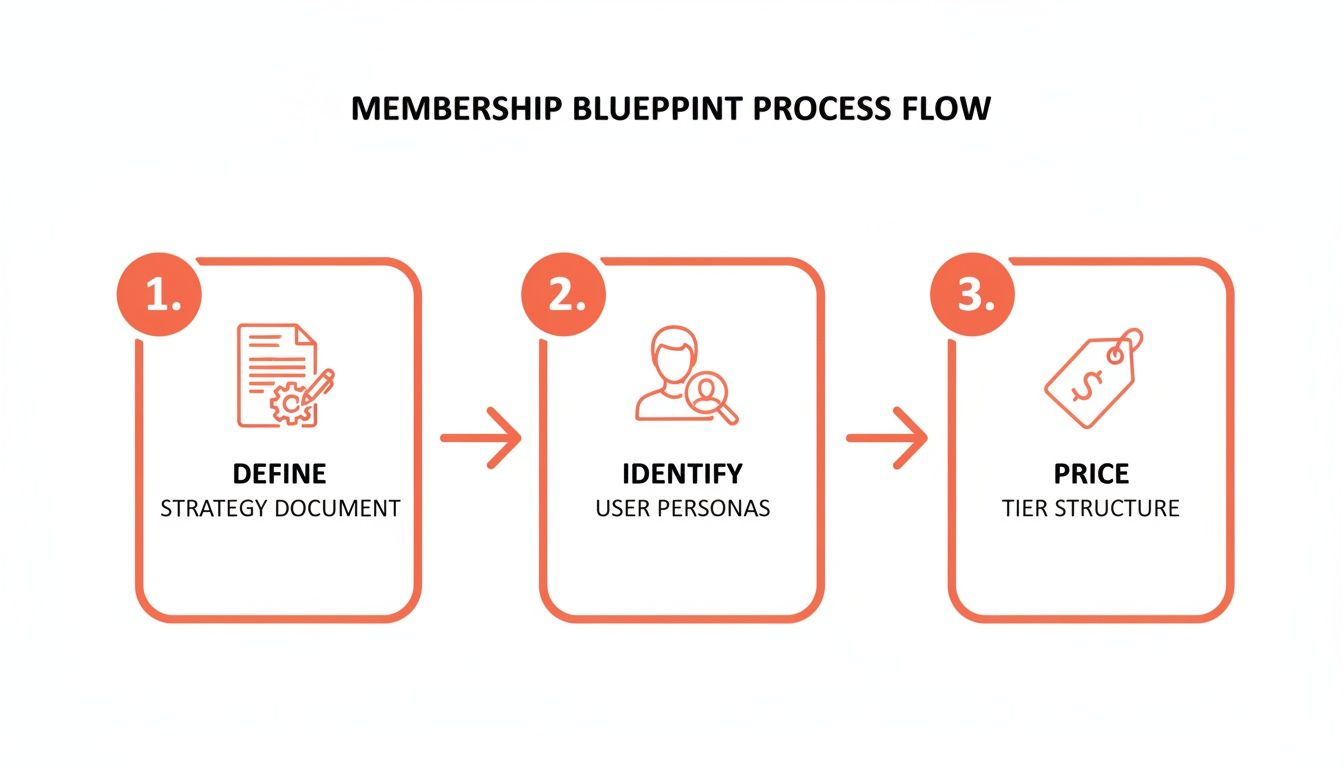
Think of it this way: every setting you configure from here on out should connect back to the value you promised in your plan. It’s not just a technical step; it's the execution of your core business idea.
Configuring Your Billing Cycles
First up is the billing cycle. This is where you set the price and how often members are charged. For instance, you might create a "Pro Plan" for $29 every month. WPSubscription also lets you add an annual option, like $299 every year, which is a great way to boost cash flow and reward longer commitments.
A critical detail here is the subscription length. You can set it to "never expire" for standard ongoing memberships or define a fixed term. This is perfect for things like a year-long coaching program where access should automatically end after a set period.
Imagine you're offering a fixed-term course:
- Product: 6-Month Spanish Fluency Course
- Price: $50 every month
- Subscription Length: 6 months
With this setup, WPSubscription handles everything. It grants access, bills monthly, and then automatically ends the subscription after the sixth payment. No manual work for you.
Leveraging Free Trials and Sign-Up Fees
Free trials are an absolute game-changer for getting hesitant visitors to sign up. When you let people see the value first-hand, conversions can jump significantly. With WPSubscription, you can easily add a free trial period—whether it's 7 days, 14 days, or a full month. It gives potential members just enough time to get hooked on your content.
On the other hand, a sign-up fee can be just as strategic. It’s a great way to cover onboarding costs or simply filter for more serious, committed members. For a high-ticket mastermind group that costs $200 per month, you could add a one-time $500 sign-up fee to make sure every new member is fully invested from the start.
A well-structured free trial removes the financial barrier to entry, letting the quality of your content do the selling. It's a low-risk "test drive" that can turn curious browsers into loyal, paying members.
Implementing Split Payments for High-Ticket Offers
For more expensive memberships, one of the most powerful conversion tools is split payments. A $1,200 annual fee can feel intimidating, but breaking it down into four payments of $300 makes it much more manageable for your customers without devaluing your offer.
WPSubscription makes this incredibly easy to set up. You just define the total number of payments needed. Let’s say you have a lifetime course priced at $1,000. You could structure it like this:
- Subscription Price: $250 every month
- Subscription Length: 4 months
After the fourth payment, the billing stops, but the member keeps their lifetime access. This simple tweak opens the door to a much larger audience who might have otherwise been priced out.
Once you have these products configured, learning how to manage subscriptions is the next logical step to keeping your members happy and your business running smoothly.
Automating Payments for Predictable Revenue
You’ve created your subscription products. Now comes the most important part: getting paid. A clunky or confusing payment process is more than just an annoyance—it's a direct path to lost sales and frustrated customers. Your goal should be a frictionless system that automates billing and makes payments feel effortless for everyone.
This is where payment gateways come into play. Think of them as the digital version of a credit card terminal, securely connecting your WooCommerce store to your member's bank. A solid membership website builder like WPSubscription won’t lock you into a single choice. Instead, it integrates directly with the world’s leading gateways, letting you pick what works best for your business and audience.
Connecting to Global Payment Gateways
The right payment gateway often comes down to geography. Different providers are more popular and have lower fees in certain parts of the world. WPSubscription’s no-code setup makes connecting to these services a breeze.
Here are some of the most popular gateways you can link up in minutes:
- Stripe: A global powerhouse known for its amazing developer tools and wide currency support. It’s a go-to choice for businesses in North America and Europe.
- PayPal: With its massive user base, simply offering PayPal can lift your conversion rates. Many customers know and trust it, making it a must-have for almost any site.
- Paddle: An excellent all-in-one option, especially if you sell software or digital products. Paddle acts as a "merchant of record," which means it handles all the sales tax and VAT compliance for you—a huge time-saver.
- Razorpay: If your main audience is in India, Razorpay is the clear winner. It supports local payment methods like UPI, which is absolutely essential for that market.
- Mollie: A fantastic choice for businesses targeting Europe. Mollie supports a ton of local payment methods specific to countries like the Netherlands (iDEAL) and Germany (SOFORT).
By supporting multiple gateways, you give customers the options they prefer and turn your site into a truly global business. You'll never lose a sale just because someone couldn’t use their favorite payment method.
Protecting Your Revenue with Dunning Management
Predictable revenue is the dream, but failed payments are a fact of life. Credit cards expire, get lost, or are declined for all sorts of reasons. If you don't have a system to handle these failures, you’ll bleed subscribers through involuntary churn—losing members who actually wanted to stay.
This is where dunning management becomes your most valuable tool. "Dunning" is simply the automated process of communicating with customers to sort out billing failures.
A smart dunning system isn't about hounding customers; it's about gracefully and automatically recovering revenue that would otherwise be lost. It turns a potential cancellation into a simple card update.
WPSubscription builds this process right into your website. When a recurring payment fails, the system doesn’t just give up. You can configure it to automatically:
- Retry the payment: The system will try charging the card again at set intervals, like three days later, then five days after that.
- Send automated email reminders: At the same time, it sends polite notifications to the member, letting them know the payment failed and giving them a secure link to update their card info.
This automated one-two punch solves the vast majority of payment failures without you having to lift a finger. For a deeper look at the specifics, you can learn more about how to set up recurring payments and the dunning features that safeguard your income. It’s a foundational piece of any successful membership business.
Designing an Engaging Member-Only Experience
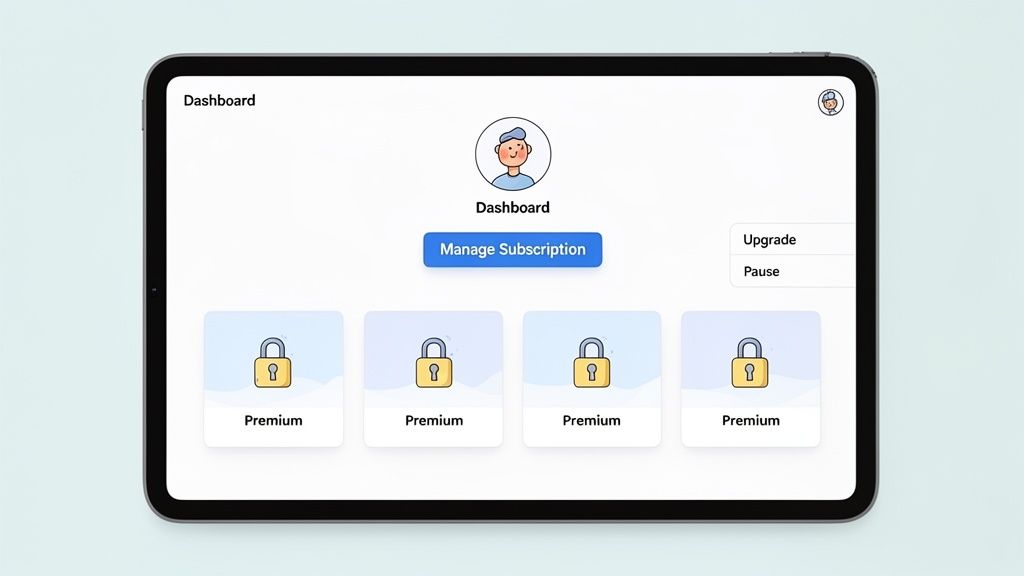
Once your payments are set up and running smoothly, it's time to focus on the real heart of your business: the member experience. A clunky or confusing members-only area is one of the fastest ways to lose subscribers. Your goal is to build a space that feels valuable and intuitive, reminding members why they signed up every single time they log in.
Your members want control and easy access. They shouldn't have to send a support ticket for simple tasks like updating a credit card or changing their plan. This is where a custom "My Account" dashboard becomes a game-changer. With a tool like WPSubscription, you can empower members to manage their own accounts right from the front end.
Think about it. A member wants to upgrade from a monthly to an annual plan to save a little money. Instead of emailing you and waiting, they just log in, click "Upgrade," and it's done in seconds. That kind of self-service is a win for everyone—your members feel empowered, and your support queue gets a lot shorter.
Building an Intuitive Member Dashboard
The member dashboard is your customer's home base. It needs to be clean, simple, and give them immediate access to everything they're paying for. The good news is you don’t need to be a developer to pull this off. WPSubscription plays nicely with page builders like Elementor and Gutenberg, so you can design it all visually.
You just create a custom dashboard page and use simple shortcodes or blocks to pull in the right information. These little snippets act as dynamic placeholders, showing each member their own specific details.
A great dashboard should always include:
- Subscription Details: Their current plan, renewal date, and cost, all laid out clearly.
- Management Actions: Obvious buttons to upgrade, downgrade, pause, or cancel.
- Billing History: A quick-look list of past payments and invoices.
- Payment Method: A secure spot to update their credit card information.
- Exclusive Content Links: Direct links to the premium articles, courses, or downloads they have access to.
This level of user-friendliness isn't just a nice-to-have anymore; it's the standard. We’re seeing this trend across the board, especially with Small and Medium-sized Enterprises (SMEs) now making up nearly 49% of the AI-powered website builder market. Since 90% of global businesses are SMEs needing these kinds of efficient tools, the market is exploding—projected to grow from $23.8 billion in 2025 to $47.84 billion by 2035.
Restricting Content with Precision
Beyond the dashboard, the exclusive content is what people are actually paying for. WPSubscription makes it incredibly simple to protect your content and link it to specific subscription plans.
You get granular control here. You can restrict an entire page, a single blog post, or even just a small section of a page by wrapping it in a shortcode. For example, you could show a premium video player only to "Gold Plan" members, while everyone else sees a friendly message inviting them to upgrade.
The real power here is turning content restriction into a sales tool. When a non-member stumbles upon a premium article, they shouldn't just hit a wall. Instead, show them a compelling preview and a clear call-to-action to join.
Of course, a great experience goes beyond the launch. It's about long-term engagement. There are great lessons to be learned from other subscription models, like how to launch a profitable subscription box game, that show how to turn initial interest into a loyal, recurring fanbase.
If you're still exploring the right tools for the job, our guide on the best membership plugins for WordPress is a great place to compare the top options. By pairing a great dashboard with smart content restrictions, you create an exclusive experience that makes your membership feel truly special.
Your Pre-Launch Checklist and Growth Playbook
The build is done and your content is locked and loaded. But hold on. Don't rush to flip the switch just yet. A rushed launch is a surefire way to get flooded with support tickets and make a terrible first impression. A methodical pre-launch checklist is your best friend, ensuring everything works exactly as you planned for a smooth day-one experience.
The single most important thing you can do right now is to test the entire user journey yourself. I don't just mean checking if the login page works. You need to live the member experience from beginning to end. Sign up for every single membership tier, especially those with free trials or unique billing cycles.
The Essential User Journey Test
Your mission here is to find and fix every single friction point before your first real member does. Put on your "new customer" hat and go through the process as if you know nothing about the site. Be critical.
Start by running through these core scenarios:
- Flawless Signup and Payment: Can you easily buy a subscription using all your connected payment gateways? Test both monthly and annual options to be safe.
- Immediate Content Access: The moment a payment goes through, are you instantly granted access to the right premium content? Check it.
- Trial Period Logic: If you set up a free trial, does it activate correctly? Even more important, does the system try to charge you when the trial ends? This is a common trip-up.
- Account Management: Head over to the member dashboard. Can you easily view your subscription details, check billing history, and find the option to cancel?
- Cancellation Flow: Go ahead and cancel. Does the process work without a hitch? Does your access get revoked at the correct time, like at the end of the current billing period?
Pro Tip: Use a real credit card and run a small, live transaction. Simulating the payment process with a live gateway is the only way to be 100% certain your payment automation is dialed in.
This kind of hands-on testing is guaranteed to expose any overlooked settings or confusing steps. While you’re at it, double-check that you (the site admin) are receiving the correct email notifications for new signups, payments, and cancellations. These alerts are your command center.
Your Post-Launch Growth Strategy
Once you're live, the game shifts from building to growing and keeping your members happy. Your focus has to turn to delivering continuous value and actively fighting churn. A great membership website builder gives you the data you need to make smart calls.
This is exactly why so many entrepreneurs build on WordPress. It’s a powerhouse, running over 68% of all websites that use a known CMS. Its open-source nature means you get deep integration with tools like WPSubscription, giving the 43% of the entire web running on WordPress a level of flexibility standalone builders can't touch. You can see the latest market share data here to get a sense of its massive footprint.
With that powerful foundation, here are two proven strategies you should implement right away for growth:
- Offer Strategic Annual Discounts: This is the lowest-hanging fruit for reducing churn. When a member commits to a year, you lock in revenue and they get a better deal. Frame it as a loyalty reward, something like "Get 2 Months Free" when they choose the annual plan.
- Create Community-Building Content: Go beyond just articles and videos. Host member-only Q&As, start a private forum, or share some behind-the-scenes content. Community turns a simple transaction into a real connection, which makes members far less likely to leave.
Make it a habit to dive into your WPSubscription admin dashboard. Keep a close eye on key metrics like your active subscription count, monthly recurring revenue (MRR), and churn rate. These numbers tell the story of your business's health and will guide your strategy, helping you turn that initial launch into a long-term, sustainable success.
As you get serious about building your membership site, you’ll naturally run into some questions. That’s a good sign—it means you’re thinking through the important details. Let’s tackle some of the most common ones we see from creators just like you.
Can I Integrate a Membership Builder With My Online Course Plugin?
Yes, and you absolutely should. This is where a WordPress-based system really shines. A smart plugin like WPSubscription is built to play nicely with the entire WordPress ecosystem, especially popular LMS (Learning Management System) plugins.
Imagine you sell courses with LearnDash or LifterLMS. You can connect a specific subscription product directly to a course enrollment.
When someone buys your "Gold Tier" membership, they’re instantly enrolled in the corresponding course. If their payment fails or they cancel, WPSubscription automatically revokes their access. It’s a completely hands-off system for selling your educational content.
What Is the Best Way to Handle Failed Subscription Payments?
Failed payments are a fact of life, but they don't have to mean lost revenue. The key is to handle them gracefully with an automated process called dunning management. This is your secret weapon against involuntary churn—when good customers lose access because of an expired card, not because they wanted to leave.
WPSubscription handles this for you. You can set it to automatically retry a failed payment on a schedule you choose, like three times over a nine-day period.
At the same time, it sends friendly, automated emails to the customer. These emails explain the problem and provide a secure link to update their payment method. This gentle, proactive approach saves most failed payments without you lifting a finger, protecting your recurring income.
Key Takeaway: A smart dunning system isn't about hounding customers for money. It's an automated safety net that recovers revenue by making it simple for members to fix billing issues and stay with you.
How Do I Offer Different Content to Different Membership Tiers?
This is the very heart of a tiered membership model. The whole point of having "Bronze" and "Gold" plans is to control who sees what.
When you create your subscription products, you use content restriction rules to manage access. With WPSubscription, this is incredibly straightforward, especially when you’re using an editor like Elementor or the native Gutenberg block editor.
You get pinpoint control over what gets locked down:
- Entire Pages or Posts: You can hide a whole article or resource page, making it visible only to members of a specific plan.
- Specific Sections: Want to show a teaser to everyone but keep the best part for paying members? You can restrict access to individual blocks or sections within a single page, like hiding a premium video behind a "Gold Plan" paywall.
If a visitor tries to access content they don't have permission for, they’ll see a message prompting them to subscribe or upgrade. This turns your premium content into its own best salesperson.
Is It Better to Offer a Free Trial or a Low Introductory Price?
There's no single right answer here—the best choice depends entirely on your offer and your audience. Both are great ways to get new sign-ups, but they attract different kinds of customers.
A free trial is fantastic when people need to experience the value before they commit. Think large content libraries, community forums, or software. It removes all financial risk and lets the quality of your product do the selling.
On the other hand, a low introductory price (like "$1 for your first month") works wonders for attracting more serious, committed customers. Even a small payment acts as a filter, weeding out casual browsers and bringing in people who are more likely to become long-term members.
WPSubscription supports both free trials and custom sign-up fees, so you have the flexibility to test both. See what resonates with your audience and drives the highest lifetime value.
Ready to turn your expertise into a recurring revenue stream? WPSubscription provides all the tools you need to launch and grow a successful membership site on WooCommerce. Get started with WPSubscription today