So you want to run subscriptions on WordPress. Smart move. But here’s what’s going to surprise you: WordPress doesn’t actually have subscription features built in. At all. Zero. Nothing.
I know, I know. WordPress powers like 40-something percent of the internet, and they forgot to include subscriptions? Well, they didn’t forget. They just never added it to the core software.
But here’s the good news. You can absolutely run subscriptions on WordPress. You just need to add the functionality yourself. And honestly? It’s not that complicated once you understand how it works.
Let me walk you through the whole thing, because I spent way too many hours figuring this out the hard way, and I’d rather save you the trouble.
Understanding WordPress and Subscriptions
WordPress started out as blogging software back in like 2003. Over the years, it turned into this massive platform that can do basically anything. But the core philosophy stayed the same: keep WordPress itself simple and lean, let plugins handle the specialized stuff.
So WordPress gives you the foundation (content management, users, pages, posts, all that). But if you want to sell subscriptions? That’s plugin territory.
And that’s actually not a bad thing. Think about it: if you’re just running a blog, you don’t need subscription features cluttering up your dashboard. But if you are running subscriptions, you can add exactly the functionality you need without any extra junk.
When people ask “Does WordPress allow subscriptions?” what they’re really asking is whether it’s possible. And yeah, it’s totally possible. WordPress provides the platform, plugins provide the subscription management, and together they work pretty well.
Why Build a Subscription Business on WordPress
Before we get into the technical stuff, let’s talk about why WordPress makes sense for this.
You own everything. That’s huge. With platforms like Patreon or Substack, you’re basically renting space. They own the platform, they set the rules, they can change things overnight.
With WordPress, it’s your site. Your subscribers. Your data. Nobody can pull the rug out from under you.
WordPress is stupid flexible. Want to sell online courses? Cool. Premium content? Sure. Community access? Yep. Software licenses? Go for it. Digital downloads? Obviously. You’re not locked into one specific model.
Costs are predictable. You’ll pay for hosting (maybe $20 to $50 per month for decent hosting), your domain (like $15 a year), and your subscription plugin (varies, but often $100 to $300 per year).
That’s basically it. No percentage of revenue. No transaction fees beyond normal payment processing. No surprise charges when you hit certain subscriber counts.
WordPress plays nice with other tools. Need email marketing? Hook up Mailchimp or ConvertKit. Want analytics? Use whatever you prefer.
Need a forum? Add one. The ecosystem is massive, so you’re not stuck with whatever integrations some platform decided to build.
And it scales. Start with ten subscribers, grow to ten thousand (same platform). You don’t hit some arbitrary limit where you have to migrate everything to a different system and hope nothing breaks.
Types of Subscription Models You Can Build
WordPress subscription plugins support pretty much any model you can think of. Here’s what I see people doing:
Membership sites are the classic model. Pay monthly or yearly, get access to exclusive content. Works great if you’re creating courses, tutorials, resources, or just premium articles. I’ve seen coaches charge anywhere from $20 to $500 a month for this, depending on the value.
Online courses and training are huge right now. Instead of selling one course for $997, you create a whole academy. Members pay monthly and get access to everything you’ve created. More sustainable income for you, more value for them.
Digital product libraries give ongoing access to stuff people download. Templates, graphics, code, photos, whatever. Designers love this model because they can keep adding to the library and subscribers keep getting more value.
Software as a service works if you’ve built a tool or plugin. Instead of selling it once, charge monthly for continued access and updates. More predictable income, and customers are more likely to actually use it when they’re paying monthly.
News and premium content sites are like magazine subscriptions for the internet. People pay for your journalism, analysis, or whatever specialized content you produce. This model’s making a comeback as ad revenue gets worse.
Community and forums charge for access to the community itself. The content is almost secondary (people are paying to be around other members and have discussions). Works really well in niche industries.
You can mix and match these, too. Content plus community. Courses plus downloadable resources. Whatever makes sense for what you’re building.
How WordPress Subscription Plugins Actually Work
Let me explain the technical side without getting too nerdy about it.
When you install a subscription plugin, it adds new features to WordPress. You get new menus in your admin area where you can create subscription plans. Set the price, billing frequency, and what people get access to (all that).
The plugin connects to payment processors. Usually Stripe or PayPal, sometimes others. When someone subscribes, the payment processor handles the money part and sets up automatic billing. The plugin gets notified and creates the subscription in your WordPress database.
Access control is where things get interesting. The plugin watches who has active subscriptions and what level they’re at. When someone tries to view restricted content, the plugin checks their status. Active subscription at the right level? Show the content. No subscription or wrong level? Block it.
Automation handles the ongoing stuff. Subscriptions renew automatically. Failed payments trigger warning emails. Cancellations revoke access. Upgrades adjust permissions. You set it up once, and it just runs.
Member management gives you a dashboard to see everyone who’s subscribed. Their status, payment history, and engagement (all there). You can manually adjust things if needed, but mostly you won’t have to.
Email notifications keep everyone in the loop. New subscribers get welcome emails. Renewals get confirmed. Failed payments get followed up on. Cancellations get acknowledged. All automatic.
Reporting shows you the numbers. Monthly recurring revenue, churn rate, lifetime value, popular plans (whatever metrics you need to understand how your business is doing).
Setting Up Subscriptions on WordPress: The Process
Alright, let’s walk through actually setting this up.
Start with solid hosting. Don’t cheap out here. Your subscription site will process payments and hopefully get decent traffic. I’d recommend managed WordPress hosting from someone like Kinsta or WP Engine. Costs more than shared hosting, but worth it.
Pick your subscription plugin. Do some research on what fits your needs and budget. Most offer demos or trials, so test before committing. We’ll talk about specific recommendations in a minute.
Install the plugin through your WordPress dashboard. Plugins, then Add New, then Search, then Install, then Activate. Pretty straightforward. You’ll see new menu items pop up after activation.
Connect a payment processor. You need a Stripe or PayPal account. The plugin will ask for API keys (you get those from your payment processor’s dashboard). Copy, paste, done. This lets the plugin talk to the payment processor securely.
Create subscription plans. Decide on pricing and billing frequency. Monthly? Yearly? Both? Also, figure out trial periods if you want them. Give each plan a name and description that makes sense to subscribers.
Set up access rules. Tell the plugin what content each subscription level can see. Maybe Gold members see everything, Silver members see some stuff, and non-members see nothing. However, you want it structured.
Design your subscription pages. You need a signup page where people choose plans and subscribe. A member dashboard where they manage their account. Maybe some teaser content for non-members. Most plugins include templates you can customize.
Configure emails. The plugin sends automated emails for various events. Review them, customize the wording to sound like you, and make sure they match your brand. Don’t skip this (these emails are important touchpoints).
Test everything before launching. Subscribe to your own site with a test card. Go through the whole experience. Try canceling. Try changing plans. Make sure emails work. Make sure access control works. Break things and fix them before real customers show up.
Launch and monitor. Once you’re confident everything works, promote it. Watch your dashboard closely for the first few weeks. Jump on any failed payments or access issues immediately.
Why WPSubscription Works So Well for Recurring Revenue
Among all the options out there, WPSubscription really stands out for building recurring revenue. Let me break down why.
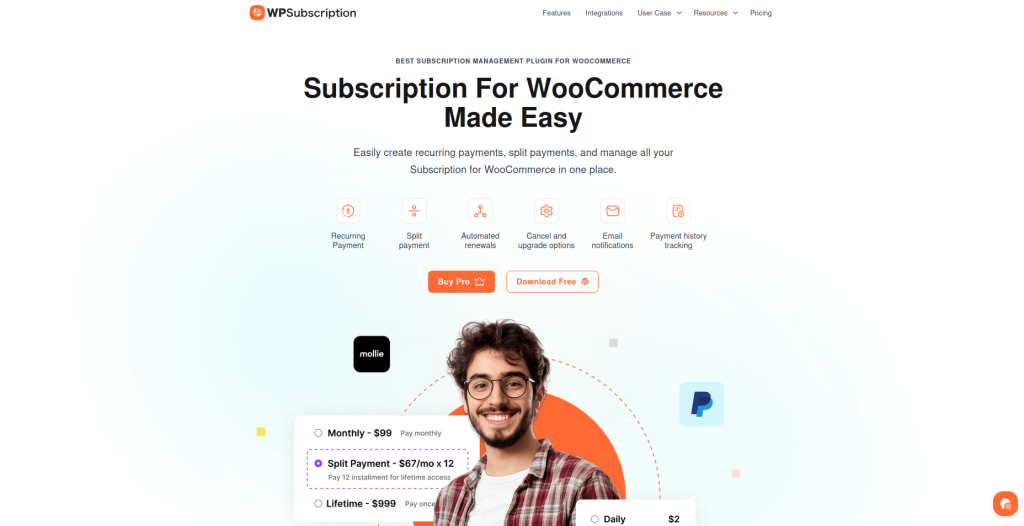
Setup is actually easy. I’m not just saying that—I’ve walked non-technical clients through it, and they got it working. The interface doesn’t assume you know what you’re doing. It guides you through the process step by step.
Payment processing just works. Sounds basic, but I’ve used plugins where renewals would randomly fail or double-charge people. WPSubscription’s billing engine is solid. Things process on schedule, failures get handled properly, and everything flows smoothly.
Access control is flexible without being confusing. You can do simple stuff (this category is for members only) or complex stuff (these three pages are for Gold members except on Tuesdays). Whatever you need, the rules make sense.
The member dashboard gives subscribers control. They can update their payment card, change plans, pause subscriptions, or cancel—all without contacting you. That cuts support requests dramatically.
Reporting shows the metrics that actually matter for subscription businesses. Monthly recurring revenue is right there. Churn rate is tracked. Plan popularity is visible. You can make data-driven decisions instead of guessing.
Support responds when you need help. The documentation covers most situations, but when you hit something weird, actual humans reply with useful answers. Not canned responses—real help.
Updates come regularly. WordPress changes, payment processors update their APIs, bugs get discovered—WPSubscription stays on top of it. You’re not stuck with abandoned software.
Pricing is reasonable. You’re not paying enterprise prices for features you don’t need. But you’re also not stuck with a barely functional free version. The pricing makes sense for what you get.
Check it out: WPSubscription
Common Challenges and How to Handle Them
Running subscriptions on WordPress isn’t always smooth. Here’s what I’ve dealt with and how to handle it.
Payment failures are more common than you’d think. Cards expire every year. Bank accounts run dry. Credit card companies flag suspicious transactions. Good plugins have dunning management (automated emails that politely bug people to update their payment info). Set these up from day one.
Content planning gets harder with subscriptions. You need to consistently deliver value. If subscribers feel like they’re not getting their money’s worth, they’ll cancel. Plan your content. Stick to a schedule. Deliver consistently.
Pricing anxiety will mess with your head. You’ll constantly worry your prices are wrong. Too high and nobody subscribes. Too low and you can’t sustain it. Here’s what works: research what competitors charge, start somewhere reasonable, adjust based on actual data. Don’t be afraid to raise prices for new subscribers while keeping existing ones at their current rate.
Technical issues happen. Plugins conflict. Themes break layouts. Updates break things. Keep backups. Test updates on a staging site first. Have a developer on speed dial for when things go sideways at 11pm.
Customer support grows with your subscriber count. Every subscription business needs systems for handling questions, cancellations, refunds, and tech problems. Write clear policies. Create FAQ pages. Consider adding live chat or a ticketing system.
Churn management needs attention. Some cancellations are normal. High churn means something’s wrong. Survey people who cancel. Look for patterns. Fix the underlying problems. Maybe your onboarding sucks. Maybe your content isn’t matching expectations.
Making Your Subscription Business Successful
Having the tech working is just the start. Actually succeeding requires strategy.
Value proposition is everything. Why should someone pay you monthly? What problem are you solving better than anyone else? Get clear on this before you launch. Your marketing flows from this answer.
Onboarding sets the tone. New subscribers should immediately know how to access everything and what to do first. Welcome email series, getting started guide, clear navigation (all critical). Make week one so valuable that they couldn’t imagine canceling.
Consistent delivery builds trust. If you promise weekly content, deliver weekly content. If you’re running a community, show up in the community. Subscribers stick around when they can count on you.
Communication keeps people engaged. Regular emails about new content, features, or community stuff remind people why they’re paying. Silent subscription businesses see higher churn.
Listening to feedback helps retention. Your subscribers will tell you what they want if you ask. Run surveys. Read cancellation reasons. Pay attention to engagement. Then actually do something with what you learn.
Pricing evolves. Start simple (one or two plans). As you learn what people value, adjust. Don’t get fancy with complicated pricing structures at the beginning.
Trial periods reduce friction. Let people try before committing. A week or two gives them time to see the value without risk.
Annual plans improve cash flow. Offer a discount for paying yearly. Brings in more money upfront and reduces churn since people commit longer.
Alternative Approaches to WordPress Subscriptions
Plugins aren’t the only option, though they’re the most common.
Custom development means building subscription functionality yourself or hiring someone to do it. Complete control, no licensing costs. But you’re responsible for maintenance, security, updates, and new features. Only makes sense if you have serious technical resources or very specific needs plugins can’t handle.
Hosted platforms like Patreon or Substack can integrate with WordPress. Your main site runs on WordPress, but subscription management happens elsewhere. Simpler setup, but you lose control and pay percentages forever.
Hybrid approaches mix WordPress with external tools. Maybe WordPress for content but Stripe Customer Portal for subscription management. Or WordPress for your site but Memberful for memberships. More flexible but more complex to manage.
For most people, subscription plugins hit the sweet spot of power, simplicity, and cost. Unless you’ve got unusual requirements, they’re the way to go.
Getting Started Today
The best time to start was last year. Second-best time is right now. Stop overthinking it.
Pick a subscription plugin that fits your needs. WPSubscription is solid for most situations—reliable, affordable, straightforward.
Set up simple first. One or two plans, access to premium content, basic automation. Add complexity later after you learn what your audience wants.
Launch small. Tell your email list. Share with social followers. Run test ads. Get your first ten subscribers and learn from them.
Iterate based on feedback. Your first version won’t be perfect. That’s fine. Talk to early subscribers, see what works and what doesn’t, and improve.
Building recurring revenue through subscriptions takes time. But WordPress gives you everything needed to make it happen. The tools exist. The opportunity is there. Now it’s about taking action.
Start simple. Stay consistent. Adjust based on what you learn. That’s how you build a successful subscription business on WordPress.